

Managing busy lamp fields (VVX 3xx/4xx series)
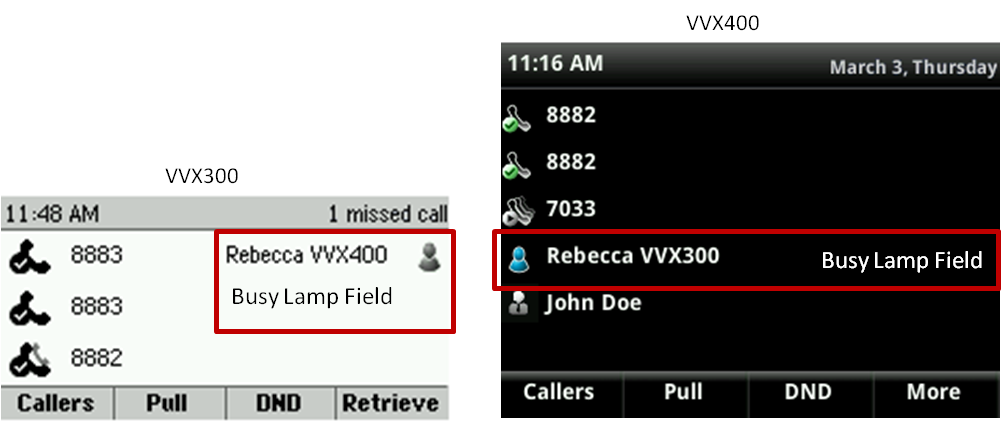
A busy lamp field lets you monitor and answer a colleague's extension. If you speak with that person frequently, you can easily dial the number by pressing the busy lamp field key, indicated with a silhouette icon. In addition, busy lamp fields can be used while transferring calls to your colleague's line and adding people to a conference call.
Viewing a busy lamp field
Your phone will have one or two private lines and are identified with your extension and a handset icon. Lines programmed as busy lamp fields fall below your private lines and are identified by a silhouette icon (gray on a VVX 3xx phone and blue on a VVX 4xx phone).
Answering a busy lamp field
Busy lamp fields have similar, but more powerful functionality than shared call appearances. When you answer a busy lamp field, you are pulling the call from the busy lamp field to your primary line. It cannot be placed on hold and resumed on the owner's phone. If the owner needs to resume the call, you must transfer the call back to the owner.
To answer an incoming call for a busy lamp field:
- Press the pickup soft key or press the button next to the ringing busy lamp field key.
The call is now on your primary line and not on the busy lamp field key.
- If the caller needs to speak to the person dialed, you must transfer the call to that individual; the call cannot be placed on hold and picked up on the primary phone.
Using a busy lamp field key
In addition to answering and monitoring other’s lines, use busy lamp field keys as short cuts, so you don't have to manually dial extensions. Press these busy lamp field keys to:
- Dial—place a call to that individual
- Transfer—transfer a caller to that individual
- Conference—add that individual to your call
Note: To understand the differences between shared call appearances and busy lamp fields, use this chart for a quick comparison of these features. Learn how to monitor your busy lamp fields with this article.



