

Managing busy lamp fields on your phone (VVX 50x/60x series)
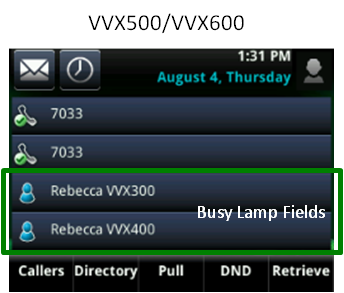
A busy lamp field lets you monitor and answer a colleague's extension. If you speak with that person frequently, you can easily dial the number by tapping the busy lamp field line key, indicated with a blue silhouette icon. In addition, busy lamp fields can be used while transferring a call to your colleague's line and adding people to a conference call.
Viewing a busy lamp field
Line keys programmed as busy lamp fields fall below your private lines and are identified by a silhouette icon. Your phone will have one or two private lines and are identified with your extension and handset icon.
Answering a busy lamp field
Busy lamp fields have similar, but more powerful functionality, than shared call appearances. When you answer a busy lamp field, you are pulling the call to your primary line.
To answer an incoming call from a busy lamp field:
- Tap the Pickup soft key or tap the busy lamp field line.
- If the caller needs to speak to the person dialed, you must transfer the call to that individual; the call cannot be placed on hold and picked up at the primary phone.
Using a busy lamp field key
Use busy lamp field keys as short cuts, so you don't have to manually dial extensions for these actions:
- Dial—tap this busy lamp field key to place a call
- Transfer—tap this busy lamp field key to transfer a caller
- Conference—tap this busy lamp field key to add a caller to a call
Note: If you want to compare the differences between shared call appearances and busy lamp fields, use this chart for a quick comparison of these features.



