Transferring callers directly to voicemail on your phone (VVX 50x/60x series)
Use the transfer to voicemail feature to send callers directly to voicemail so they can leave a message. When you transfer a call directly to voicemail, the phone will not ring. If you transfer callers directly to voicemail, they can also press 0 to speak to another person (known as zero out) if the phone is programmed with an escape to operator option.
To transfer a caller directly to voicemail with a call in progress:
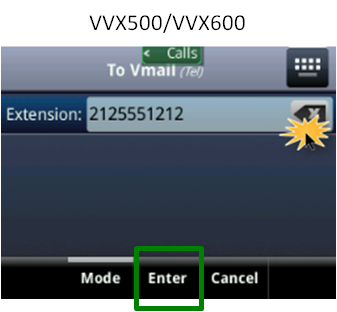
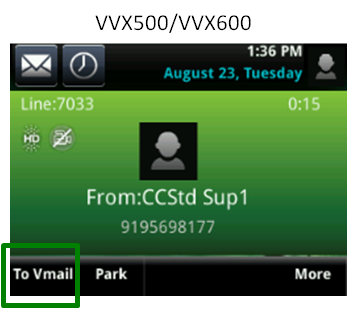
- Tap the To Vmail soft key. (You may need to tap the More soft key to access the To Vmail soft key.)
- On the keypad, enter the extension number for the voicemail box.
- Tap the Enter soft key to release the call.
The caller goes directly to voicemail and can leave a voicemail message.
If you enter an incorrect number, you can either cancel the transfer process or correct the number prior to releasing the call.
To cancel transfer to voicemail:
- Tap the Cancel soft key to return to your caller.
To correct the transfer to number:
- Tap the X icon to remove the incorrect numbers.
- Enter the correct numbers using the keypad.
- Tap the Enter soft key to release the call.