

Closing a billing request
If you no longer need us to work on an open billing request you submitted in Media portal, you can request that Lumen close it.
To close a billing request:
- Sign in to Media portal. (Get help resetting your password)
- From the main menu, select Billing > Billing Requests.
Media portal shows all open billing requests and request closed in the past 30 days with a status for each request.
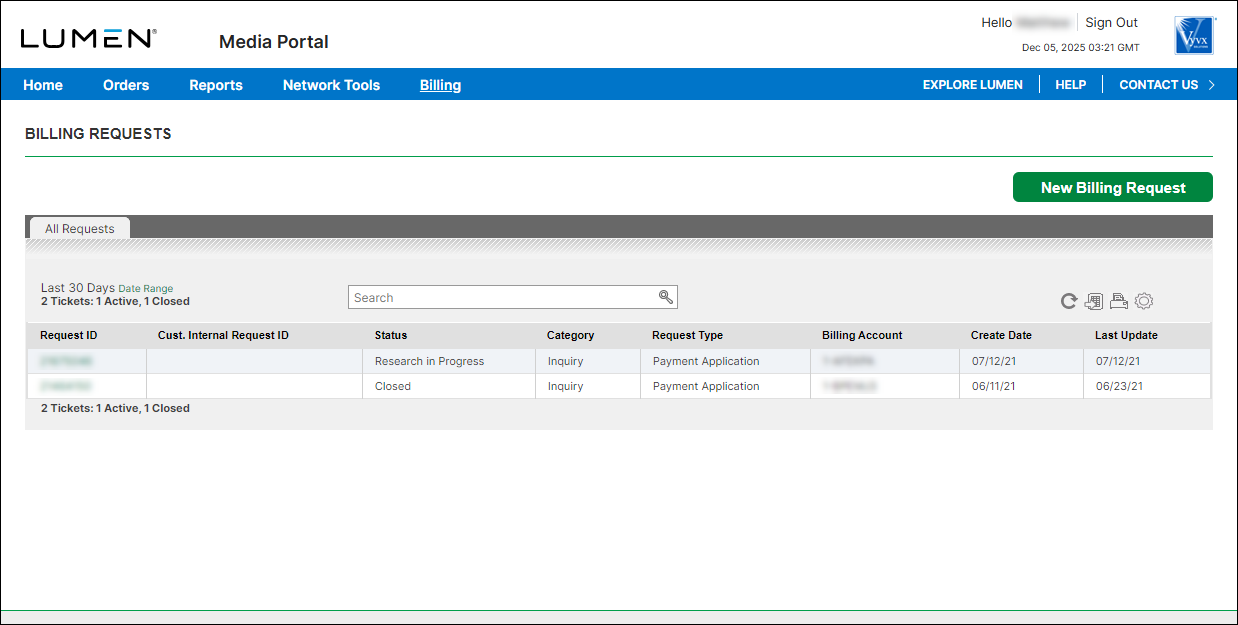
- Search for the billing request you want to work with by doing one of the following:
- Scroll through the billing requests on the screen. If you have more than 20 billing requests, you can view the rest of your requests by using the arrows at the bottom of the list to view more.
- Search for the billing request by typing search criteria in the Search field.
- Scroll through the billing requests on the screen. If you have more than 20 billing requests, you can view the rest of your requests by using the arrows at the bottom of the list to view more.
- When you find the billing request you want to work with, click the link in the Request ID column.
Media portal shows details for the billing request you selected.
- Review the request to make you you selected the correct request, then click Close Request.
- Type the reason you want to close the billing request, then click Submit.
Media portal confirms your request to close the billing request.
- Click OK.
A Lumen billing specialist will review the reason and close the billing request for you; Media portal changes the status changes to Closed.



