

Porting a phone number to a Voice Complete service
If you have phone numbers with another provider, you can port them to Lumen and add them to a Lumen® Voice Complete® service by submitting a change request in Lumen Connect.
Note: Save time in Lumen Connect by downloading the porting template and letter of authorization form and completing them before starting your change request.
Lumen Voice Solutions Center (VSC) service level agreement
The following business days are dependent on a clean ticket/order request with no rejections or clarifications needed. These intervals are for the completion of the initial ticket request which is to enter orders to the respective teams for processing only and do not include the time it takes for the services to be completed and turned up. Intervals begin when the Voice Solutions Center receives the ticket.
- New request: 8 business days
- Move/add/change order for existing customer: 5 business days
Porting service level agreement
The following business days are dependent on clean orders with no rejections from the losing carrier(s). Carriers may require longer intervals due to account features and their specific business rules. These intervals are for the local number portability piece only and are not included in the other work required to establish services. Intervals begin when LNP has received the order from the Voice Solutions Center.
- 1–49 numbers (standard port): 3–8 business days
- 50–749 numbers: 10–15 business days
- 750–10,000 numbers: 15–20 business days
- 10,000+ numbers (max amount per customer per day): 20+ business days
Porting from Legacy Qwest and Legacy CenturyLink is not considered an internal port and follows external carrier processes and service level agreements. Porting from the affiliate network may take eight business days (on average) from date of submission. However, the timeframe all depends on whether the affiliate records are clean for the customer’s account. Expedites are not guaranteed and are only granted when an out-of-service condition is present.
Porting from Legacy TW Telecom is not considered an internal port and follows external carrier processes and service level agreements. Porting from the TW Telecom network can take an average of three business days (depending on the quantity of phone numbers) from the date of LNP submission. Expedites are not guaranteed and are only granted when an out-of-service condition is present.
LNP project ports
Project ports are processed differently than standard ports because of the amount of phone numbers, multiple carriers, multiple locations, or products involved—and these require longer intervals to complete. Project status is communicated by the Enterprise LNP team once they receive the project and scrub it for accuracy. This includes, but is not limited to, port submission, jeopardy resolution, supps, cancels, and snapbacks.
LNP standard ports
Standard ports are typically processed more quickly than project ports because of the smaller amount of phone numbers and locations. Status is communicated by the Enterprise LNP team once the order has been received and submitted. This includes, but is not limited to, port submission, jeopardy resolution, supps, cancels, and snapbacks.
Internal ports
An internal port consists of phone numbers that are porting from one legacy Level 3 customer (SPID 8824) to another legacy Level 3 customer (SPID 8824). The internal porting interval can be same day if needed for emergency or out-of-service situations. Status is communicated by the Enterprise LNP team once the order has been received and submitted. This includes, but is not limited to, port submission, supps, cancels, snapbacks, etc. Ports from Qwest Local or National are not considered internal according to the FCC and must be treated as external ports.
Autoport vs. scheduled port
Autoport is an automatic activation at a set time and time zone on the FOC date. Autoport can be requested for any port type: internal, standard, or project. We recommend that you don't autoport between 10:00 pm–2:00 am MT due to the Lumen general maintenance window for enhancements. The default autoport time is set to after 9:00pm MT. You must provide a time and time zone if you require a specific time outside of the default autoport time. Any autoport scheduled outside of business hours (6:00 am–6:00 pm MT, Monday–Friday, excluding Lumen holidays) will not have Lumen LNP support or losing-carrier support. For autoports up to 5000 phone numbers, we ask that you wait until 30 minutes after the autoport time to start testing. If you have any issues with autoporting outside of business hours, contact the repair team at 877-453-8353 (option 1, then 2, then 2, then 3). During business hours, contact the Enterprise LNP team using your order.
Schedued ports are a scheduled activation with a Lumen technician on the FOC date. Scheduling can be requested for any port type: internal, standard, or project. You can request scheduling during business hours (6:00 am–6:00 pm MT, Monday–Friday, excluding Lumen holidays).
After-hours porting
After-hours is considered anytime outside of 6:00 am–6:00 pm MT, Monday–Friday. A request to schedule outside of Lumen LNP hours requires after-hours support which incurs a $400 fee to you. In this support agreement, you acknowledge that there will be no support available from the losing carrier for any issues that may arise, including but not limited to translations removal or snapping back numbers. The Enterprise LNP team handles scheduling any port requested by you and will provide the after-hours agreement for review and signature if necessary. You cannot request after-hours support on a Lumen holiday.
When should/does my porting order begin?
You shouldn't submit a port order until access is in place and your customer is ready to accept the numbers.
Which sites should I port first?
We recommend that you select non-critical sites that would fall into both the standard port and project port categories. This give you visibility into the two types of migration events and porting processes. You can categorize the planning of your remaining sites based on your needs. It's important to understand the migration timelines for phone numbers within the carrier space and to ensure that both their internal process and your processes are aligned.
What is the best time of day and day of week to plan for the porting process to migrate numbers?
The best day and time to port (standard or project) is Monday–Thursday, 8:00am–5:00 pm in the time zone of the losing carrier and on Fridays from 8:00 am–3:00 pm in the time zone of the losing carrier. This helps ensure the best possibility to get losing carrier support. Lumen doesn't support porting on weekends as there will be no support from Lumen or the losing carrier.
Is there a limit to the the number of porting events I can submit and complete with Lumen (standard or project)?
You can port up to 10,000 phone numbers per day. You can submit multiple orders at once for multiple quantities of phone numbers. Note that we can only submit one order per carrier account at a time. This causes order stacking on the losing carrier service. The losing carrier can support orders from different accounts concurrently.
What kind of call testing should we do after each LNP event has completed?
The only way to test that the losing-carrier network has removed translations completely on the phone numbers in question is to initiate calls from the losing carrier network to those phone numbers. Calling the phone numbers from outside the losing carrier local rate center area will not replicate the path that calls will take from customers off the donor carrier's network. Originating a call from a wireless or other carrier network only tests the specific route the originating carrier uses to get calls to the Lumen voice network. Some customers work with their staff located at the site in question and ask they initiate test calls from lines that may still be with the losing carrier. The key is to clearly communicate what lines they need to use to help ensure the call flow is force routed through the losing carrier network. Although translation issues are rare, some customers do choose to take these steps as a precaution for some or all of their sites. If you identify any issues, contact our Repair team (877-453-8353) to research resolution or work with your scheduled activation technician.
Which entity sets the final FOC/due date for the LNP event?
When you submit the LNP order to the losing carrier, Lumen requests a specific date based upon the request we received from you. Typically, if the order is submitted within the SLA guidelines for that carrier and is a clean order with no issues that cause a rejection, the losing carrier accepts the requested due date. The losing carrier does have the legal right to respond back with a different due date than we requested. In all cases, Lumen communicates the accepted due date to you for the LNP order. You can then adjust accordingly on your side.
What is a supplement (supp)?
A supp is a request to change the due date, order attributes (such as adding or removing phone numbers), or to cancel an in-flight order. Supping an order with firm order commitment (FOC) from the losing carrier within 48 hours of the FOC date is not advised, as the risk of the carrier releasing or disconnecting their orders in error increases. We recommend requesting a supp with a minimum of five business days lead time from the FOC date when possible. Lumen may encounter rejections from the losing carrier when supping an FOC order, and there are no guarantees that the losing carrier will grant an FOC for the new date requested.
Will the circuits/trunks/services I have been procuring from the donor carrier be automatically disconnected after migrating the phone numbers to Lumen?
No, the customer of record is responsible for submitting service disconnects to the losing carrier for their services following their documented disconnect process. It’s important to discuss account disconnects with your current carrier before submitting a port order. We will not submit disconnect requests on your behalf as Lumen is not the customer of record. There are a handful of carriers that will allow for the disposition fo the remaining pipe/trunks/circuits as part of the port order.
What information do I need to put on my LOA (letter of authorization)?
To fill out the LOA, follow the instructions within the document. The LOA must contain the name and current service address of the end user and the numbers that will be ported to Lumen from the end-user’s current carrier. The LOA used must comply with FCC regulations and must be dated and signed by the end user or a person who has the authority to act as a legal agent. Once signed, Lumen LOAs are valid for six months. Most carriers require the account number and/or PIN to be provided and these can be noted on the LOA. Any features associated with the phone numbers should be removed prior to submitting the LOA. Additionally, don't place any new service orders or disconnects with your current service provider as this will cause delays in porting. For larger lists of phone numbers, you can note see attached in the LOA and attach a full list of phone numbers to the LOA.
Can Lumen assign a single project manager?
No, the Enterprise LNP team cannot assign a project manager for the duration of a porting migration project. If you need additional support and tracking, request this through your account team.
Non-responsive losing service providers/carriers
Service level agreement (SLA) exceeded condition during CSR and LSR phases:
- Lumen escalates to the first escalation point of the losing carrier.
- If no response, Lumen escalates to the second escalation contact of the losing carrier.
- If no response after second CSR request, then Lumen bypasses the CSR and proceeds with the LSR port request.
Lumen escalates the LSR to the final escalation contact until a response is received.
Resold accounts
- Resold accounts are end-user accounts that are managed by a losing service provider (LSP) who is reselling the underlying carrier voice service.
- When there are resellers involved and there are name and/or address mismatch rejections, there are usually no customer service records (CSRs) available from the underlying donor carrier.
- The total port time for an order with a reseller involved may be longer than normal due to the complexity of the port. Resolution is on a per-case basis only.
Carriers requiring special consideration
- AT&T requires a project ID for orders they classify as complex, which includes phone numbers associated with specific types of products or features (ISDN, DSL, hunt groups, etc.). Please allow five additional business days for complex orders with AT&T. There are no indicators of a complex port before submitting. AT&T solely determines the complexity of an order; the Lumen LNP team has no say in their decision.
- Verizon may classify an order as complex, which can take up to two weeks from submission to obtain FOC depending on the complexity of the account restructuring. Verizon may also require a coordinated DID port—meaning the port must be completed before 5:00 pm ET. The Enterprise LNP team communicates these details one they obtain the FOC.
- Hawaiian Telecom may require a hot cut for their ports. This is a specific time of day the port will complete. These can happen between the hours of 8:00 am–4:00 pm HT (11:00 am–7:00 pm MT) Monday–Friday.
- If your current carrier requires the account number and/or PIN for your phone numbers to be ported, please include this information on the LOA submitted with the order.
- When you submit the order, provide a CSR (customer service record). This is critical to successful porting.
- Verify all phone numbers are present on the CSR.
- If not all phone numbers under a billing telephone number are being ported, it is considered a partial port. In this case, you must designate a new billing telephone number if the current billing telephone number is being ported and the remaining telephone numbers are to stay active. You can change the billing telephone number with your carrier before the port to help ensure the Enterprise LNP team ports all requested phone numbers (including the old billing telephone number) without rejection.
- If you are partially porting away from a local QC service and you port the designated 911 phone number (S2N/service telephone number), you must provide a new 911 phone number before Lumen will issue the firm order confirmation (FOC).
- Ensure none of the phone numbers being ported have a PIC (personal identification code) freeze on them. You cannot port a phone number until a PIC freeze is removed. You need to engage the local business office of the losing service provider to remove a PIC freeze before we can send a porting request.
- Confirm that none of the phone numbers you're porting have a pending order against them. If the losing carrier has a pending order open against a phone number, it cannot be ported. (This includes feature support requests like CNAM adjustments and disconnect orders.)
- You cannot port disconnected numbers. If they are disconected, they must be reinstated before a port request can be submitted.
- Lumen does not pre-notify you of pending port-outs.
- Lumen is the carrier of record for all phone numbers on our network.
- Lumen allows port-out requests in accordance with all federal, state, and local regulations.
- The FCC has placed the responsibility of port-out authorization and validation on the gaining carrier.
- Lumen rejects any phone number port-out request if the end-user information exists within our LNP database and the zip code doesn't match the information on file.
- After a phone number has ported away from the account, we will autmatically disconnect the phone number from the account to stop the billing.
- If you have any concerns about our port-out process, contact your Lumen representative.
To port a phone number to a Voice Complete service:
- Using the left menu, click Services, click Service Requests, then click Change Requests.
Lumen Connect shows all open and recently closed change requests (by default, within the past 30 days) for your organization with a status for each request.
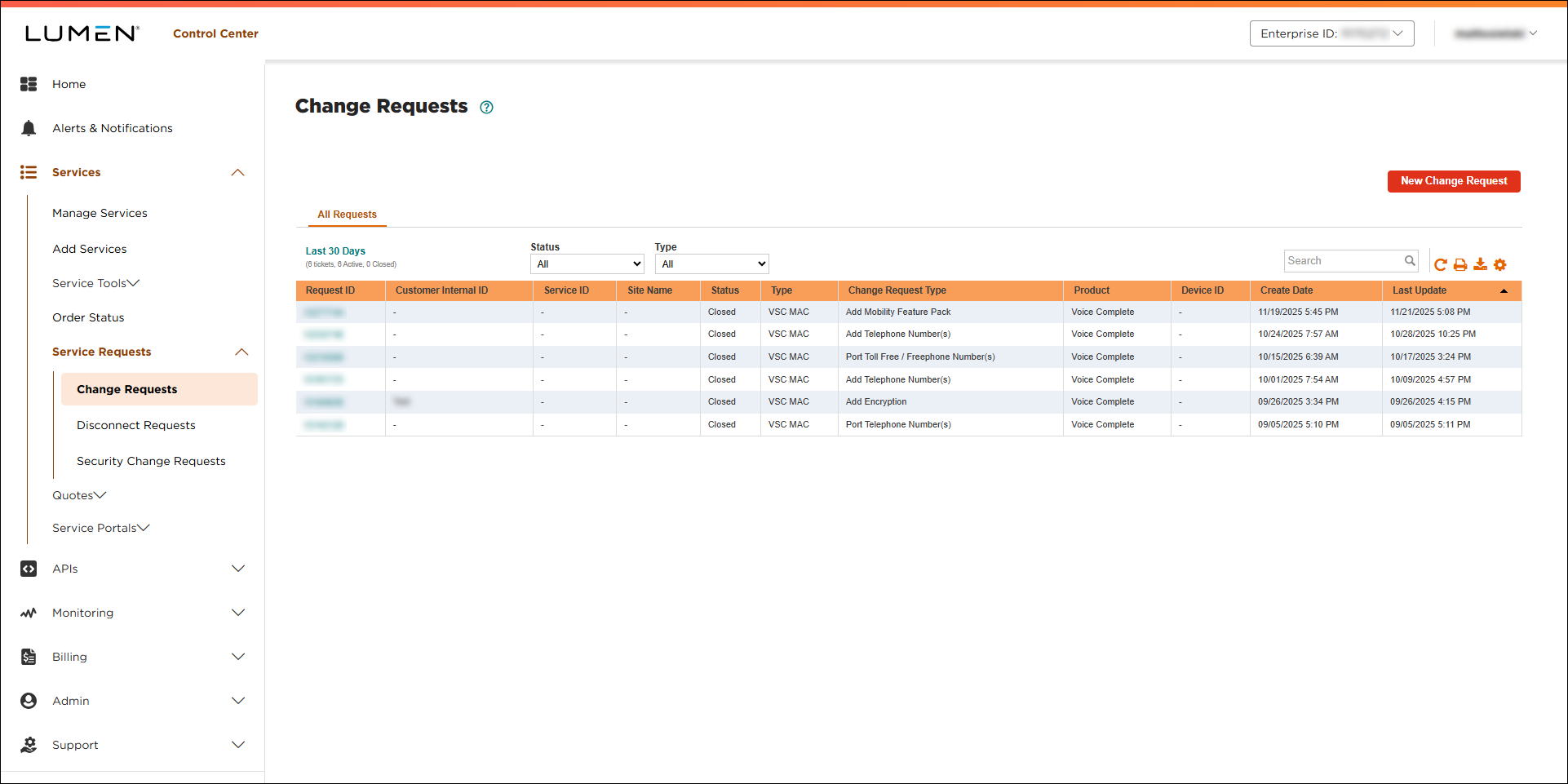
- Click New Change Request.
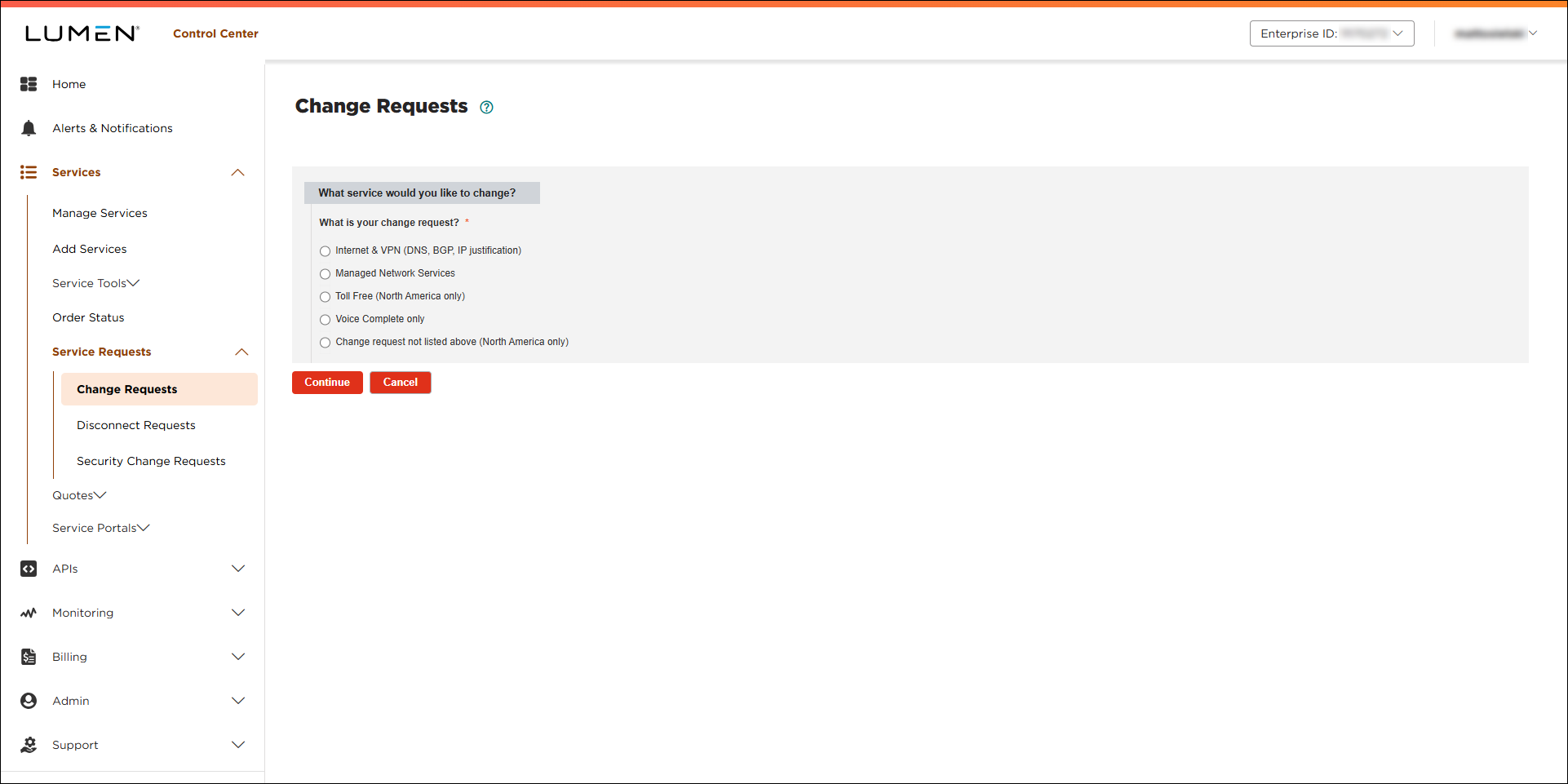
- Click the Voice Complete only radio button.
- From the Customer Number and Billing Account lists, select the customer number and billing account for the Voice Complete service.
- From the Product list, select Voice Complete.
- Click Continue.
- From the Voice Complete Change Request Type list, select Port Telephone Number(s).
Lumen Connect creates the form to hold the information for your request.
- In the Port Telephone Number(s) section, click Download Number Template.
- Open the porting template and fill in the details for the number(s) you want to port to your Voice Complete service: phone number(s) or range of numbers you want to port, service address, 911 address, calling name information, whether you want to add the Mobility Feature Pack for the number(s).
- Save the porting template.
- In the Additional Details section, do the following:
- In the Customer Requested Due Date field, select the date you'd like us to make the change.
- If you need to add a tracking or ticket number for your organization, fill in the Customer Internal Ticket ID field.
- In the Additional information that could help address this change request? field, type the route plan you want these ported phone numbers added to.
- If you have any additional information that would help us process your request, type it in the Additional information that could help address this change request? field.
- Click Download LOA and complete the letter of authorization for the number(s) you're requesting to port.
- Upload the porting template and LOA you filled in (and any additional attachments to help us process your request): click Browse, locate and select the file(s), then click Open.
- In the Customer Requested Due Date field, select the date you'd like us to make the change.
Note: Be sure to upload a current copy of your customer service record (CSR).
- Fill in the Contact Information section to tell us who to communicate with for this request (and what method to use):
- Select how we should notify you of status updates for this request: Portal only; Email and Portal; or Phone, Email, and Portal.
- Verify your contact information (or update the information for the person you'd like to be contacted with updates).
- If you need to add a secondary contact for this request, click Add Secondary Contact, then type their name, phone number, and email address.
- Select how we should notify you of status updates for this request: Portal only; Email and Portal; or Phone, Email, and Portal.
- Select the checkbox acknowledging you're requesting the change on behalf of your organization and accept and charges associated with this request.
- When you're done, click Submit.
Lumen Connect submits your change request. You can now track its status online. You can also need to update your request or close the request later as needed.



