

Navigating around your phone (VVX 3xx/4xx series)
Need help getting started with your VVX 3xx/4xx series phone? Take a tour to learn about the features of your phone:
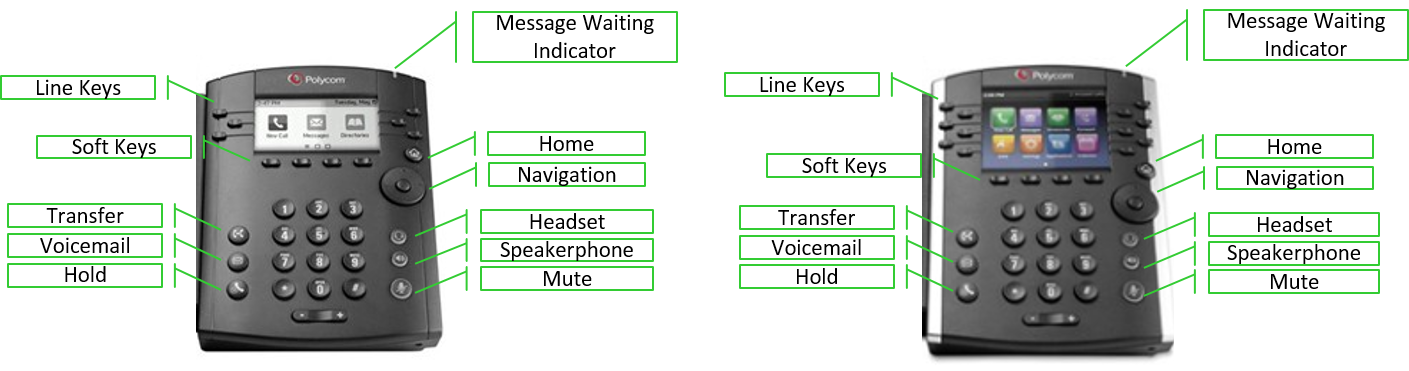
Line keys
The VVX 3xx has six programmable line keys and the VVX 4xx has 12. A standard configuration includes two primary line keys—line 1 and line 2. Remaining keys can be programmed as shared call appearances, busy lamp fields, or favorites. Line keys are the physical buttons to the left and right of the display. You can identify what is programmed on each line key by the icon associated with it:
- handset icon—primary lines or shared call appearance
- blue silhouette icon—busy lamp fields
- gray silhouette icon—favorites
Soft keys
Soft keys are buttons at the bottom of the display.
Note: Soft key buttons change as you use your phone, to use them press the physical button below the display.
Often you will see a More soft key on the right of your display. Pressing More allows you to see additional features. You can press More while on a call—and will not get disconnected.
Typical soft keys while your phone is idle (on-hook):
Typical soft keys while you're on an active call (off-hook):
Transfer button
Use the Transfer button (to the left of your keypad) to send your caller to another person internally or externally. In addition to the physical Transfer button, you can access a transfer soft key during active calls. There are two transfer types: consultative and blind. Consultative is the default and allows you to announce the caller before transferring. Blind allows you to transfer the call without speaking to the person. You can change your default transfer type at any time.
Voicemail button
To access the voicemail features, press the Voicemail button (to the left of the keypad). After pressing the button, press the Connect soft key. Enter your passcode when prompted. After you're logged in, listen to, save, delete, and forward messages and manage mailbox features, such as greetings.
Hold button
To place your caller on hold, press the Hold button (to the left of your keypad). While on an active call, you can also access the Hold soft key. Either option works. A blinking, red line key indicates a line is on hold. To return to your caller, press the blinking line key.
Home button
In addition to physical buttons and soft keys, you can access additional options by pressing the Home button, which takes you to home view. See a full list of features by using the up, down, left, and right navigation keys. When you find a feature you want, press the Select button in the center of the navigation to key.
As you navigate deeper into advanced options, press the Home button to return to your line view screen.
Typical home view options include (these options vary, depending on how your administrator set up your phone):
- New Call—place a call from your recent calls list
- Messages—access your voicemail
- Directories—access saved contacts and call history logs
- Forward—send callers to another person
- DND—send callers directly to voicemail
- Settings—change settings options such as ring tones, date/time formatting, etc.
- Applications—link to a browser
Navigation keys
Navigation keys are similar to using a joy stick. Press up, down, left, and right to move through screens, lists, settings, and more. The round button in the center of the navigation key is the select key; this plays the same role as enter on your keyboard.
Headset button
Make and answer calls using your headset, if you have a headset connected to your phone, by pressing the Headset button (to the right of the keypad). Your headset must be connected using the headset jack on the back of the phone. The Headset button glows green during an active call. To disconnect your call, press the Headset button.
Speakerphone button
Press the Speakerphone button (to the right of the keypad) to make and answer incoming calls without using your handset. The button glows green during an active call. To disconnect your call, press the Speakerphone button.
Mute button
Microphones on the VVX 3xx and VVX 4xx handsets are very sensitive! We recommend you mute your phone when you're not speaking or when speaking to someone not on the call. The Mute button (to the right of the keypad) glows red when mute is enabled. To unmute and return to your call press the Mute button again.
Volume button
The Volume button is located below the keypad. Press it to increase (+) or decrease (-) the volume for the handset, headset, speaker, or ringer.



