Edge Gateway
Managing Edge Gateway
Lumen Edge Gateway Manager
Use Lumen Edge Gateway Manager to manage your Edge Gateway devices. With this application, you can add and configure VNFs (Virtual Network Functions) and connections used by your device.
- Viewing Edge Gateway device details
- Adding a VNF to an Edge Gateway device
- Starting, stopping, or restarting a VNF
- Connecting a VNF to a vendor orchestrator
- Adding an LTE connection to an Edge Gateway device
- Editing an LTE connection on an Edge Gateway device
- Removing a VNF or LTE connection from an Edge Gateway device
SD‑WAN applications
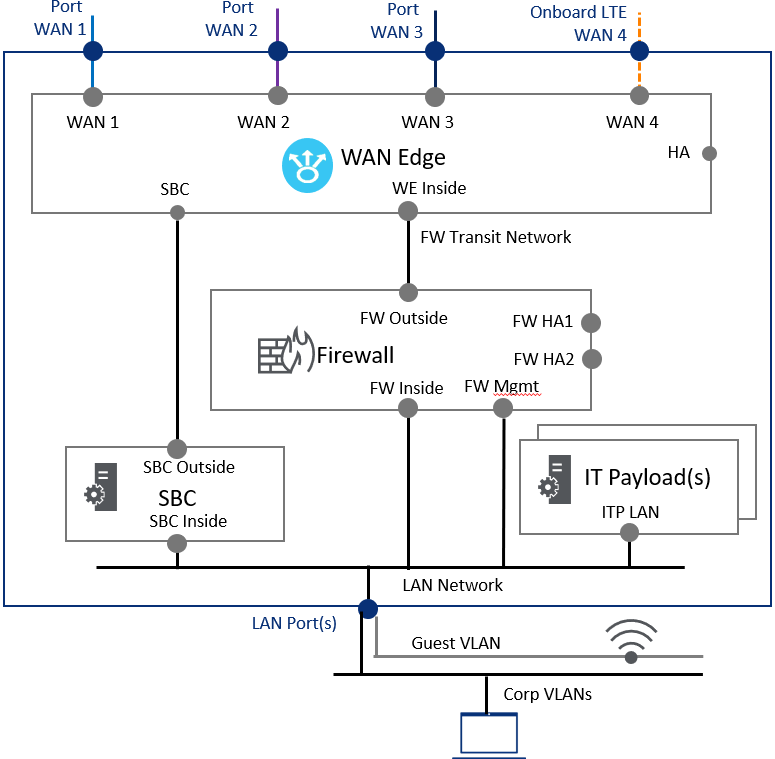
Edge Gateway enables you to deploy an SD‑WAN (software‑defined wide area network) on your device to connect applications. On the Edge Gateway device, external interfaces connect directly to the WAN ports. In the virtual machine service chain, internal interfaces connect to firewall transit networks or LAN (local area network) virtual networks.
SD‑WANs are required.
You can deploy the following on Edge Gateway:
SBC applications
Edge Gateway enables you to deploy an SBC (session border controller) on your device to control network traffic. On the Edge Gateway device, external interfaces connect to WAN Edge SBC interfaces. In the virtual machine service chain, internal interfaces connect to LAN networks.
SBCs are optional.
You can deploy the following on Edge Gateway:
IT payload applications
Edge Gateway enables you to deploy IT payloads containing virtual machines on your device. In the virtual machine service chain, LAN interfaces connect to LAN networks.
IT payloads are optional. You can have as many applications as the hardware can support depending on the device specifications (memory, storage, virtual cores).
You can deploy the following on Edge Gateway:
Firewall applications
Edge Gateway enables you to deploy a firewall on your device to protect the IT payload (virtual machines). On the Edge Gateway device, external interfaces connect to firewall transit networks. In the virtual machine service chain, internal interfaces connect to LAN networks.
Firewalls are optional.
You can deploy the following on Edge Gateway:
Edge Gateway devices
The Edge Gateway service chain provides a mapping for layer 1 virtual wire connections between the physical ports and the logical ports in the VNFs. These virtual wire connections act like trunk ports. You must configure layer 2 (virtual LAN tag) and layer 3 (IP/routing) inside the VNFs.
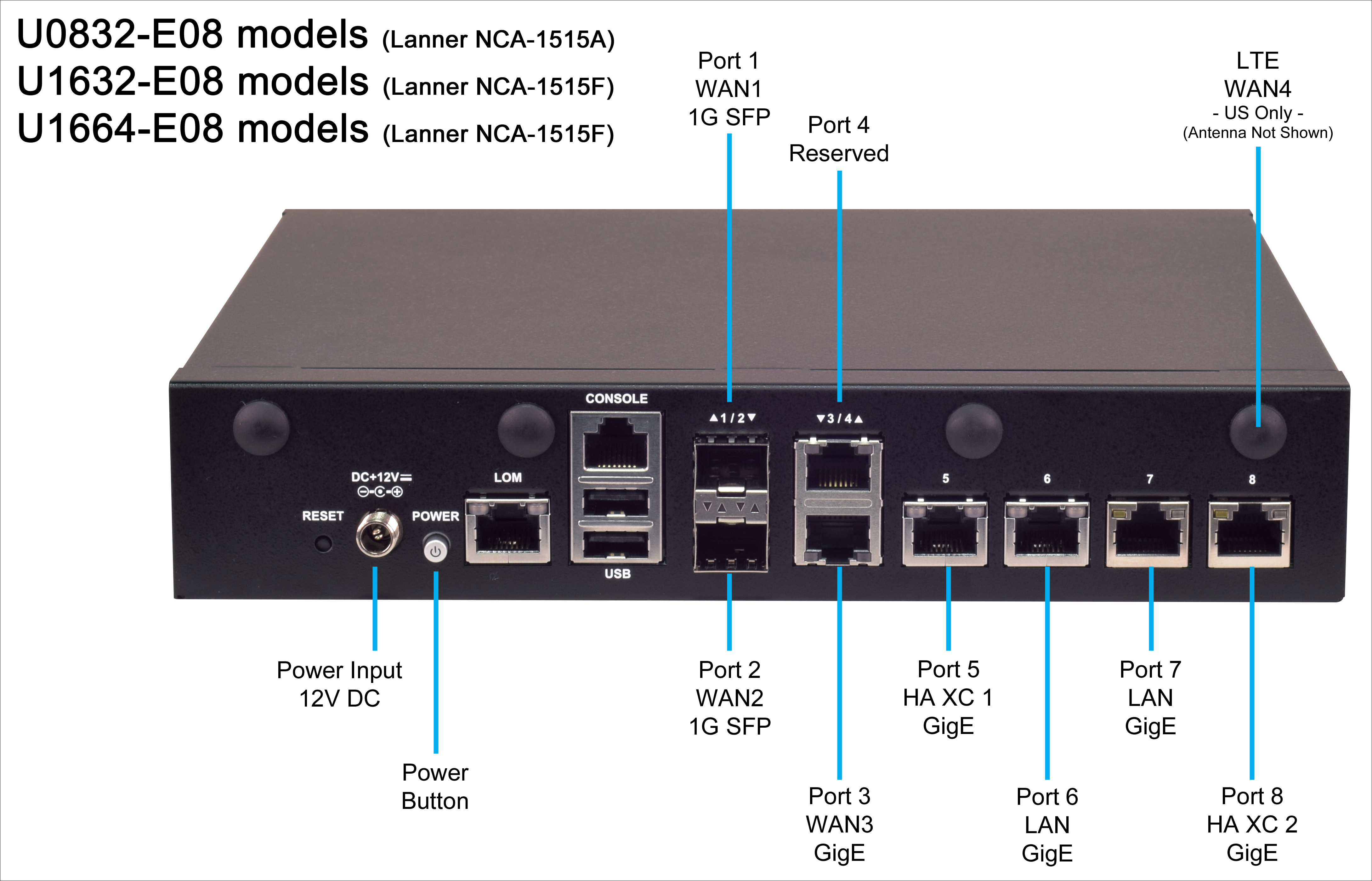
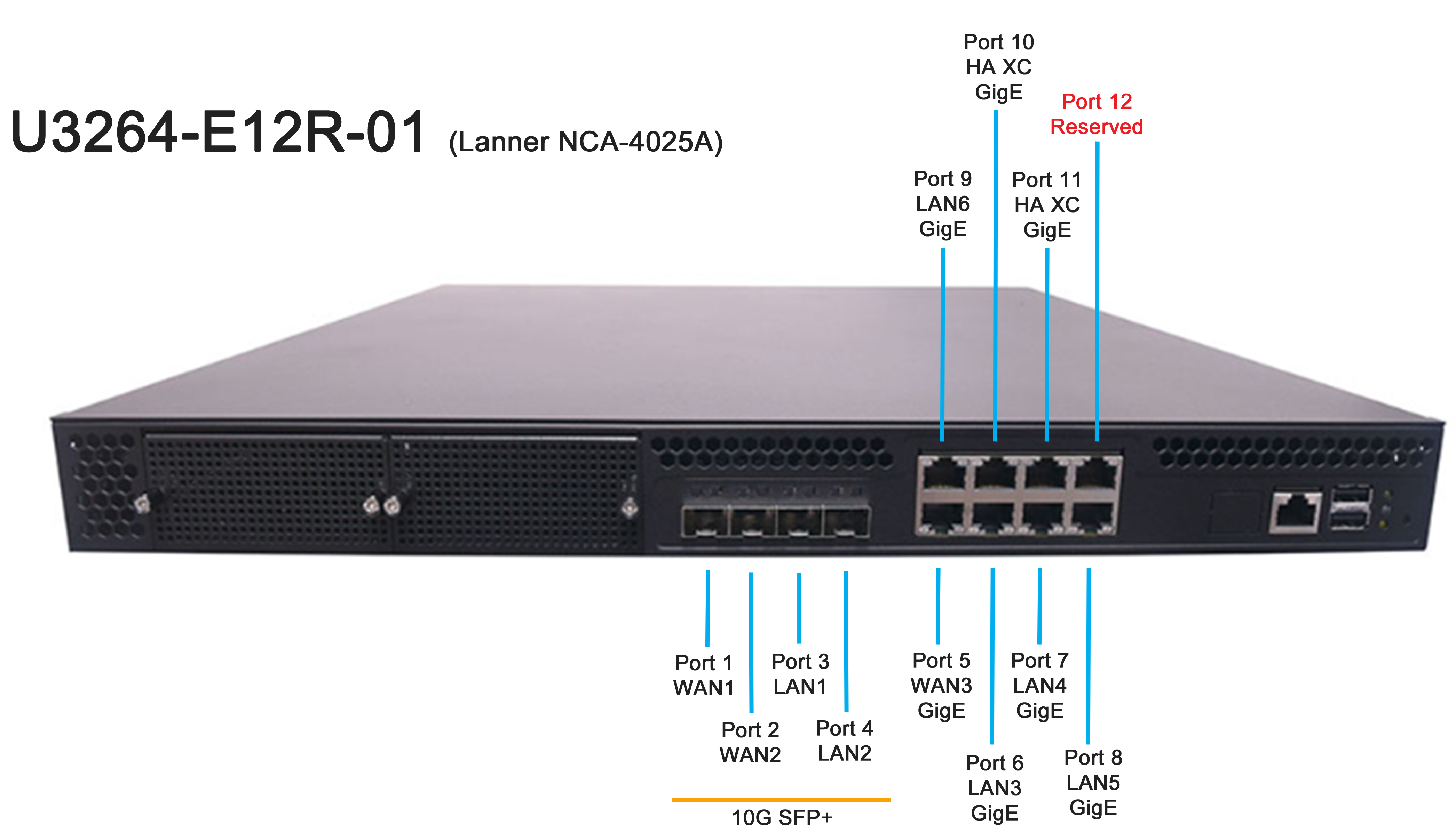
The Edge Gateway device is available in three variations of the Lanner NCA-1515A (8 core) and Lanner NCA-1515F (16 core) chassis. Each of the variations has a US model and a global model. The US models include an LTE modem. The global models do not have this modem. The size (number of cores, available storage, and memory) of the model determines the type and number of applications you can run within the IT payload component. You cannot run more applications than the device is capable of running.
| Model | Hardware vendor | Cores | Processor | Memory | Storage | Usable ports | LTE ** | Power supplies | Power input | Cooling | Form factor options |
| U0832-E08L-01 | Lanner 1515A | 8 | ATOM C3758 | 32 GB | 512 GB | RJ45 x 6 1GbE SFP x 2 1GbE | External or Internal | 1 | External AC 100~240V @50-60 Hz | Smart (Single Fan) | Desktop Rack Mount Shelf Mount |
| U1632-E08L-01 | Lanner 1515F | 16 | ATOM C3958 | 1 TB | Smart (Dual Fan) | ||||||
U1664-E08L-01 | 64 GB | 4 TB | |||||||||
| U3264E12R-01 | Lanner 4025A | 16 Physical 32 Virtual | XEON D1287NT | RJ45 x 8 1GbE SFP+ x 4 10GbE | External | 2 | Dual Internal AC 100~240V @47-63 Hz | 4x Smart Swappable | 1U 19" Rack Mount |
| Model | Vendor hardware | Cores | Processor | Memory | Storage | Usable ports | LTE ** | Power supplies | Power input | Cooling | Form factor options |
| U0832‑E08‑01 | Lanner NCA‑1515A | 8 | ATOM C3758 | 32 GB | 512 GB | RJ45 x 6 1 GbE SFP x 2 1GbE | External | 1 | External AC 100~240V @50‑60 Hz | Smart (Single Fan) | Desktop Rack Mount Shelf Mount |
| U1632‑E08‑01 | Lanner NCA‑1515F | 16 | ATOM C3958 | 1 TB | Smart (Dual Fan) | ||||||
| U1664‑E08‑01 | 64 GB | 4 TB |
Edge Gateway support
For Edge Gateway support:
- Email us
- Call 800‑536‑3273
Note: When contacting support, be sure to have the following information ready for us:
- contact information: name, email, and phone number
- description of your issue
- error logs or other pertinent data captured to help us troubleshoot your issue
- billing account number (BAN) for the service you need help with (available on your paperless or paper invoice)



