Resolving throughput issues
Are you experiencing strange throughput issues? It could be related to your MAC address. If your MAC address begins with a 4 or a 6, this could contribute to packet reordering over your Lumen service—which may cause slow speeds. This issue can appear intermittently and make it difficult to troubleshoot.
L2VPN VPLS / E-Line service
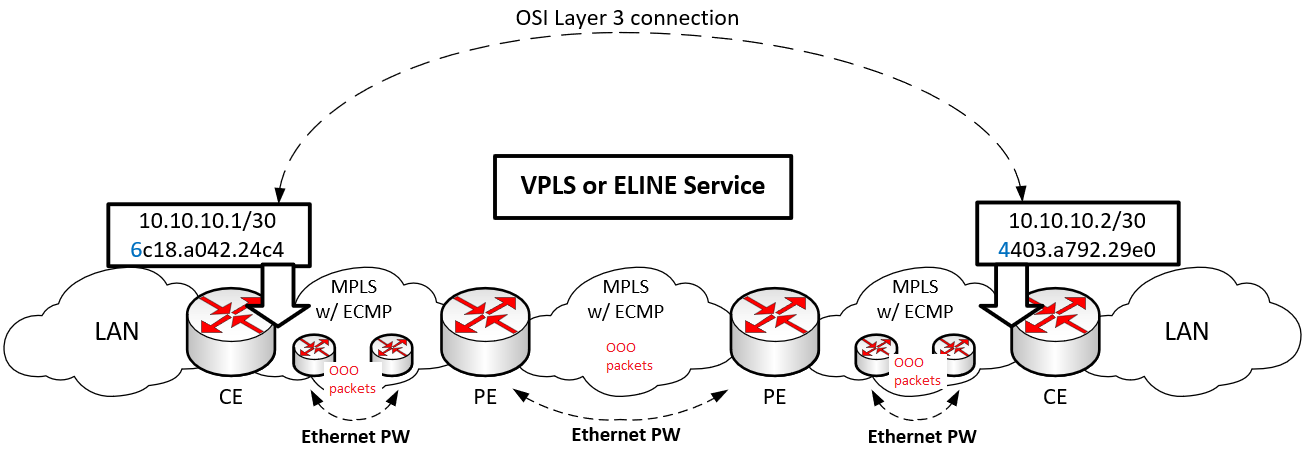
For L2VPN VPLS or E-Line, the OSI Layer 3 endpoints are on the CE devices only. Therefore, it’s only the CEs’ MAC addresses that would impact whether packets are reordered. Anywhere there are Ethernet PWs, there is potential for packet reordering. The reordering occurs with traffic destined to MAC addresses with a leading 4 or 6. In the example below, both directions would experience packet reordering because both CEs’ MACs lead with 4 or 6.
L3VPN MPLS service
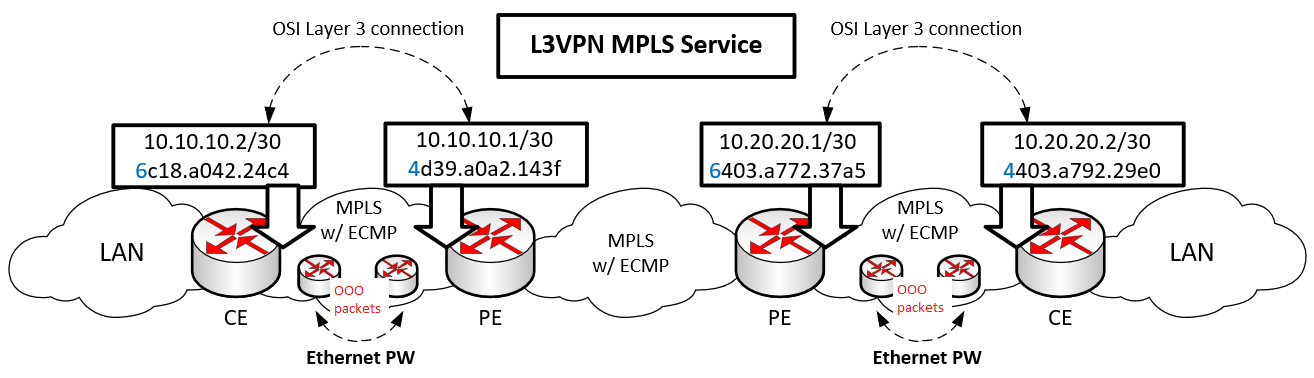
For L3VPN MPLS, the OSI Layer 3 endpoints are on the CEs and PEs. Therefore, the MAC addresses of both PEs and both CEs would impact whether the packets are reordered. Anywhere there are Ethernet PWs there, is potential for packet reordering. The reordering occurs with traffic destined to MAC addresses with a leading 4 or 6. In the example below, both directions would experience packet reordering because the PEs’ and CEs’ MACs lead with 4 or 6.
DIA service
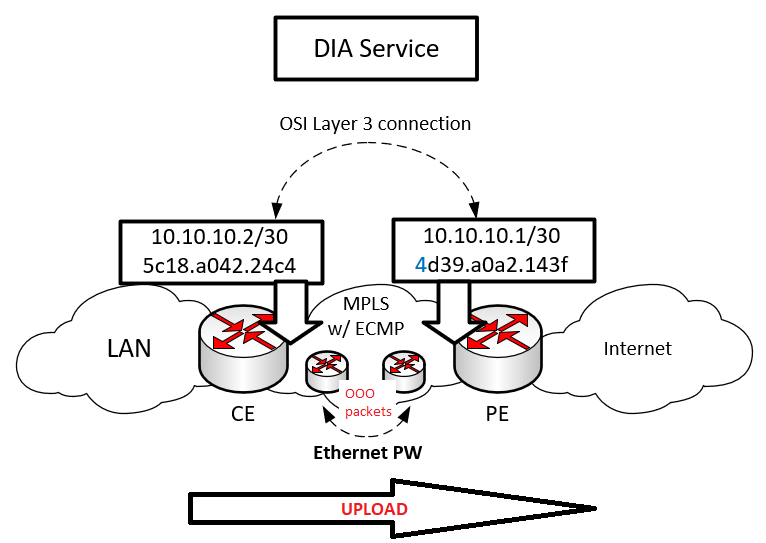
For DIA, the OSI Layer 3 endpoints are on the CE and PE. Therefore, the MAC addresses of the CE and PE would impact whether the packets are reordered. Anywhere there are Ethernet PWs, there is potential for packet reordering. The reordering occurs with traffic destined to MAC addresses with a leading 4 or 6. In the exanple below, only the upload traffic would be reordered.
You can check for this issue by looking at your CE’s ARP table. If either of the ARP entries for the CE-WAN interface begin with a 4 or 6 you could be experiencing this issue. You can open a ticket and we’ll confirm if you’re impacted by this issue and what the next steps are.
Examples of checking the ARP table
Cisco IOS [CE-WAN interface is GigabitEthernet0/0]
CE-ROUTER#show arp
Protocol Address Age (min) Hardware Addr Type Interface
Internet 192.168.233.1 131 6c18.a042.24c4 ARPA GigabitEthernet0/0
Internet 192.168.233.2 - 4403.a792.29e0 ARPA GigabitEthernet0/0
~~~~~~~~~~~~~~~~~~~~~~~~~~~~~~~~~~~~~~~~~~~~~~~~~~~~~~~~~~~~~~~~~~~~~~~~~~~~~
Juniper [CE-WAN interface is ge-0/0/0]
User@CE-ROUTER> show arp
MAC Address Address Name Interface Flags
40:19:aa:01:b1:79 192.168.1.1 192.168.1.1 ge-0/0/0 none
64:b5:2f:f1:8f:c5 192.168.1.2 192.168.1.2 ge-0/0/0 none
~~~~~~~~~~~~~~~~~~~~~~~~~~~~~~~~~~~~~~~~~~~~~~~~~~~~~~~~~~~~~~~~~~~~~~~~~~~~~
Fixing the issue
- Option 1: enable the control word on the Lumen network or the last-mile provider’s network:
- If the PW (pseudowire) is on the Lumen network, we will enable the PW control word for you.
- If the PW (pseudowire) is on the last-mile provider’s network, Lumen works with the last-mile provider to attempt to have the PW control word enabled. In certain cases, the last-mile provider can’t enable the control word as it breaks other services like OAM (operations, administration, and Maintenance) or CoS (class of service). If that’s the case, option two would be the best bet.
- If the PW (pseudowire) is on the Lumen network, we will enable the PW control word for you.
- Option 2: modify the MAC address on the PE or CE device so that the first character doesn’t begin with a ‘4’ or ‘6’.
- PE: If it’s the PE’s MAC that begins with a 4 or 6 Lumen updates this MAC address for you. This update may impact other customers, so a maintenance window may be required as to help minimize their impact.
- CE:
- If the CE is a Lumen-managed device, we will update the MAC address for you.
- If you manage your own CE, you will need to update the MAC address on your CE’s WAN interface, so the first character doesn’t begin with a ‘4’ or ‘6’. Some examples on how to do this are included below.
Note: Some routers don’t provide an option to modify the MAC address.
- If the CE is a Lumen-managed device, we will update the MAC address for you.
- PE: If it’s the PE’s MAC that begins with a 4 or 6 Lumen updates this MAC address for you. This update may impact other customers, so a maintenance window may be required as to help minimize their impact.
- Option 3: install a new circuit. In rare cases, there may not be an option to enable the control word or modify the PE/CE MAC address. In these cases, a new circuit may have to be installed that doesn’t have this problem.
Examples of updating a MAC address
Cisco IOS [CE-WAN interface is GigabitEthernet0/0]
CE-DEVICE#sho int GigabitEthernet0/0
GigabitEthernet0/0 is up, line protocol is up
Hardware is PQ3_TSEC, address is 4403.a798.29e1 (bia 4403.a798.29e1)
CE-DEVICE #config t
Enter configuration commands, one per line. End with CNTL/Z.
CE-DEVICE (config)#interface GigabitEthernet0/0
CE-DEVICE (config-if)#mac-address 5403.a798.29e1
CE-DEVICE #sho int GigabitEthernet0/0
GigabitEthernet0/0 is up, line protocol is up
Hardware is PQ3_TSEC, address is 5403.a798.29e1 (bia 4403.a798.29e1)
~~~~~~~~~~~~~~~~~~~~~~~~~~~~~~~~~~~~~~~~~~~~~~~~~~~~~~~~~~~~~~~~~~~~~~~~~~~~~
Juniper [CE-WAN interface is ge-0/0/0]
User@CE-ROUTER> show interfaces ge-0/0/0
Physical interface: ge-0/0/0, Enabled, Physical link is Up
Interface index: 134, SNMP ifIndex: 508
Current address: 6c:5e:ab:e5:f5:80, Hardware address: 6c:5e:ab:e5:f5:80
User@CE-ROUTER> configure private
User@CE-ROUTER# set interfaces ge-0/0/0 mac 5c:5e:ab:e5:f5:80
User@CE-ROUTER# commit and-quit
User@CE-ROUTER> show interfaces ge-0/0/0
Physical interface: ge-0/0/0, Enabled, Physical link is Up
Interface index: 134, SNMP ifIndex: 508
Current address: 5c:5e:ab:e5:f5:80, Hardware address: 6c:5e:ab:e5:f5:80
~~~~~~~~~~~~~~~~~~~~~~~~~~~~~~~~~~~~~~~~~~~~~~~~~~~~~~~~~~~~~~~~~~~~~~~~~~~~~
Technical explanation
When traversing an MPLS network, if the traffic is carried using an Ethernet PW (pseudowire) there is a possibility that packets will be reordered due to ECMP (equal-cost multipath) mechanisms within the MPLS network. This reordering of packets can have a negative impact on your traffic (voice, video, or data). Lumen has observed that this issue often impacts data traffic, specifically TCP throughput.
ECMP/MPLS hashing issue
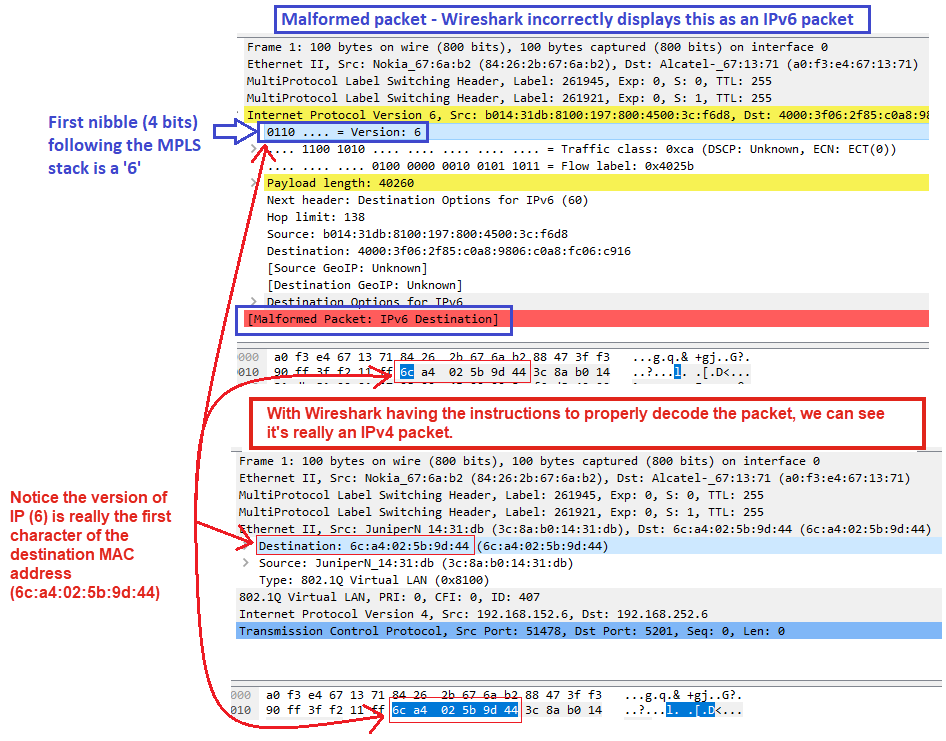
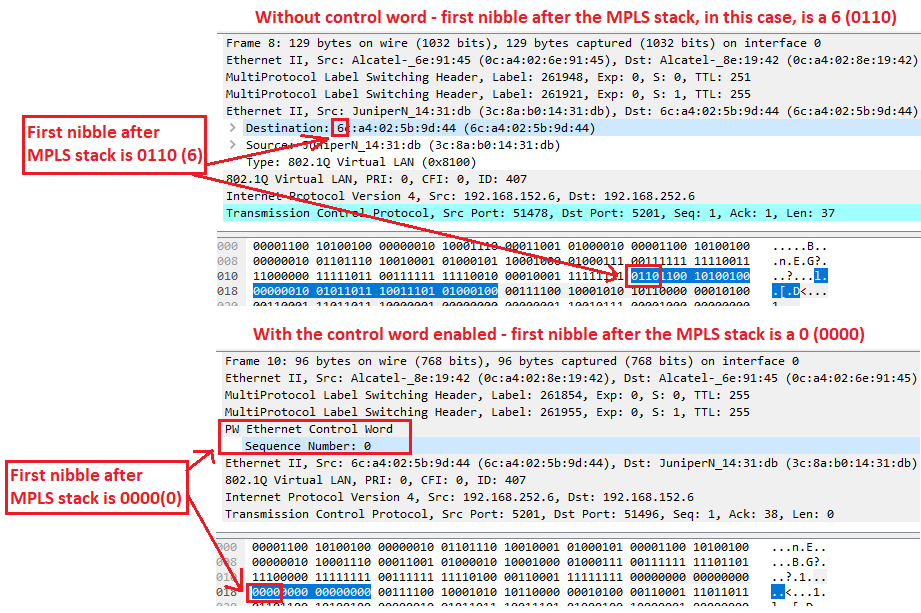
Normally, each protocol header will have an identifier so that it understands the payload. Ethernet II has the ethertype, IPv4 has the protocol ID, IPv6 has the next header, etc. MPLS has no such identifier in its header, so it doesn’t know what the MPLS payload will be. Normally, ECMP will examine the first nibble (4 bits) of the IP header to determine its version. If it’s a 4, it’s an IPv4 packet, if it’s a 6, it’s an IPv6 packet. With this issue, the MPLS router assumes that the packet carries a IP payload if the first nibble following the MPLS stack contains a 4 or 6. For an Ethernet PW, this first nibble following the MPLS stack is the first character of the destination MAC address inside the Ethernet II header. This means the MPLS router may mistake the MPLS packet as an IPv4 packet if the destination MAC begins with a 4 or as an IPv6 packet if the destination MAC begins with a 6. Because the MPLS router incorrectly identifies the packet as an IP packet rather than an MPLS packet, the normal tuple fields used for hashing will be out of alignment and traffic belonging to the same flow is load balanced over multiple paths causing out-of-order packets. Normally, traffic belonging to the same flow is pinned to the same path to ensure packets remain in order. For more details on the MPLS/ECMP hashing issue, please see the following RFCs:
TCP congestion control behavior
Every time a TCP device receives an out-of-order packet, it replies with a duplicate ACK. If enough duplicate ACKs are generated (TCP duplicate ACK threshold: 3 “Dup ACKs”), it causes TCP to retransmit the packet. This threshold is also used for packet loss recovery as packet loss will appear to TCP as out-of-order packets. Anytime the TCP duplicate ACK threshold is exceeded, the missing packet (set of bytes) is retransmitted. TCP wasn’t designed to retransmit every time packets arrive out-of-order as TCP can put them back in the right order and there’s no need to retransmit a packet that has successfully been delivered. However, the TCP duplicate ACK threshold is in place to strike a balance between not taking too long to recover from packet loss and not assuming that every out-of-order packet was due to packet loss. When a packet is retransmitted, TCP will reduce its congestion window according to the congestion algorithm in use. This results in slow throughput as the TCP performance is a function of the TCP window size divided by the RTT (round-trip time). A smaller TCP window equates to a slower speed, for example:
(TCP Window (bytes) * 8) / (RTT (ms) / 1000) = TCP throughput (Mbps)
(500,000 bytes) * 8) / (50 ms / 1000) = 80 Mbps
(250,000 bytes) * 8) / (50 ms / 1000) = 40 Mbps
For more details on the TCP behavior, please see the following RFC:
Additional details to note
- If you have a Lumen point-to-point wave service or if you connect directly to a Lumen PE device, you service isn’t impacted by this issue.
- Packets inside the same flow can be reordered because of this issue.
- Only packets destinated to a leading 4 or 6 MAC address experience this issue. This could mean the issue appears in the download direction only, the upload direction only, or in both directions.
- Just because packets are out of order doesn’t mean they will always cause TCP to slowdown. There can be out-of-order packets and duplicate ACKs that don’t cause retransmissions. This can give the appearance of an intermittent throughput issue as sometimes OOO (out-of-order) packets will slow down TCP and other times it won’t.
- Lumen may have to enable the control word in one or more MPLS networks.
- One or more MAC addresses may have to be modified
- Oftentimes RFC2544 or Y.1564 tests won’t show this issue, but OSI Layer 4 tests like iPerf will show this issue.
- UDP-iPerf should show if there are out-of-order packets. Seeing the issue in a TCP test may require taking a packet capture.
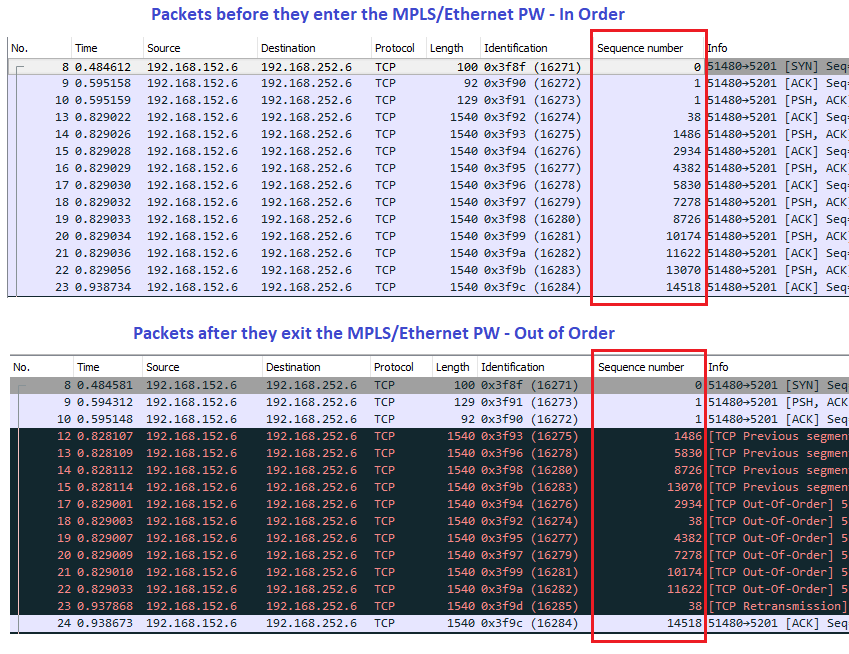
- Because the packets are out of order, a packet capture may show retransmissions without any packet loss.
- Packet loss can be observed by looking for errors or drops or issuing a ping. With out-of-order packets, there is no CLI command that explicitly tells you when this issue is occurring. The easiest way to check is looking at the ARP/MAC-address tables, but packet captures can also help verify.
Wireshark snapshot: decoding the packet
Wireshark snapshot: comparing with/without the control word
Wireshark snapshot: out-of-order packets