Loading navigation…
-
Documentation home -
Lumen Connect -
Other portals -
Product documentation -
Carrier port-out tools -
Readiness -
AI tools
-
Lumen Connect overview -
Getting started -
Services -
APIs -
Monitoring & Reports -
Billing -
Admin -
Support -
Orders (Wholesale) -
General topics
-
Other portals overview -
Media portal -
DDoS Mitigation & Reporting -
Security Solutions portal -
VoIP portal
-
View all product support -
Infrastructure -
Connectivity -
Security -
Communication -
Media & Entertainment -
Disconnect services
-
Port-out tools overview -
Carrier Port-Out Tool -
LSR portal -
Virtual Front Office
-
Readiness overview -
Product-specific readiness -
Handbooks
-
AI tools overview -
Ask Lumen AI agent -
NORA email agent
-
All infrastructure services -
Dedicated Cloud Compute -
Edge Bare Metal -
Edge Private Cloud -
Encrypted Wavelength Service -
Network Storage
-
All connectivity services -
Cloud Interconnect -
Ethernet On-Demand -
Ethernet Fabric Connect -
Fabric Port -
Fiber+ Internet -
Intelligent Internet (formerly Internet On-Demand) -
IP VPN On-Demand -
Multi-Cloud Gateway -
NaaS Port -
On-Demand services -
Troubleshooting tools
-
All security services -
Adaptive Network Security -
Adaptive Threat Intelligence -
Application Delivery Solutions -
DDoS Hyper -
DDoS Mitigation Service -
Lumen Defender Powered by Black Lotus Labs -
Lumen SASE with Fortinet -
Lumen SASE with Versa -
Lumen SASE with VMware -
SASE Solutions -
SD-WAN with Cisco Meraki -
SD-WAN with Versa Networks
-
All communication services -
1+ Switched and Toll Free -
Cloud Voice -
Hosted VoIP -
Local Inbound (LI) -
Lumen Solutions for Microsoft Teams -
Lumen Solutions for Webex -
Lumen Solutions for Zoom -
Lumen Solutions for Zoom for Government -
SIP Trunking -
Toll-Free Service -
Unified Communications and Collaboration -
Voice Complete -
VoIP Enhanced Local (ELS) -
VoIP services
-
Vyvx® Broadcast Solutions
-
North America -
Asia Pacific (APAC)
-
Contact us
Using the navigation keys on your phone (VVX 3xx/4xx series)
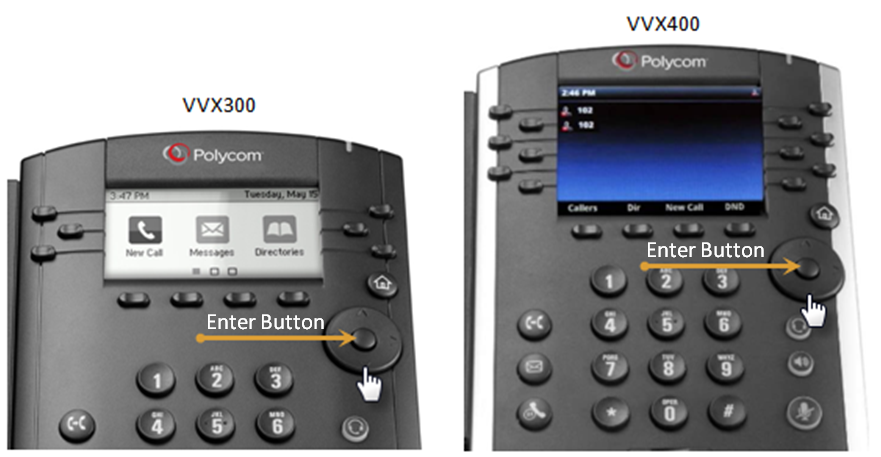
The navigation keys are located to the right of your display (under the Home button).
Use the up, down, left, and right navigation keys to move through various options and settings, such as call logs, feature settings, home view, etc.
The round button in the center of the navigation key is the Enter button. Use this button interchangeably with the Select soft key to navigate through setting changes.
New to this phone? Learn how to navigate around your phone