Prepare to activate a service
Use this guide to help you through your activation and to help ensure you can begin using your services as quickly as possible.
Please read this guide carefully. If you have questions, please contact your customer care manager (CCM) or the project manager listed in your connection email.
- Activate on your own
- Activate with Lumen
- Activate a managed service
Basic steps to activation success
Before activating your service, please complete the following steps:
- Confirm your hardware is installed and set up on our network.
- Ensure wiring is extended to the equipment location at your site.
- Verify the port is in service.
- Configure your hardware with applicable port settings and ensure light levels are adequate (if applicable).
- If you ordered a third-party cross-connect or local loop, verify installation has been completed.
Technical support contacts
| Scheduled activations (over‑the‑top services) A Lumen technician helps you activate your services |
|---|
Event coordination with your customer care manager (CCM):
|
| Self-service activations (non-scheduled activations) You activate services on your own—no event coordination needed |
|---|
If you have trouble while activating your services
|
|
Resolving issues after activation
|
If you have problems after activating your service
|
Basic troubleshooting tips
The following are common causes that prevent successful passing of traffic. To help you quickly resolve, we recommend that you double‑check the following items before contacting us. Refer to your connection notice or IP configuration email for technical parameters and information associated to your service installation.
- Verify power is correctly connected to your equipment by cycling the power or turning off and then back on if this will not disrupt any other services.
- Confirm appropriate compatibility of physical port/SFP type (optical, electrical, OCn, ethernet) and cabling/fiber type (coax, single‑mode, multi‑mode) associated to the service type and adjacent equipment physical output.
- If applicable, verify optical bandwidth (10 Mbps, 100 Mbps, 1000 Mbps) matches the adjacent Lumen equipment. Our policy is to hardcode speed and duplex at 10/100 base T, inclusive of ports that are a 10/100 combination.
- Confirm cabling is installed correctly by simply unplugging the cable and plugging it back in to ensure it has been connected properly. If that does not provide resolution, the cable may need a straight through or crossover, or the fiber connection may need to be rolled.
- Verify distance of cabling run is within specifications for CAT‑5/CAT‑6/CAT‑7/other fiber types related to the equipment transmit/receive parameters.
- If applicable, verify light levels being received and transmitted are within equipment specifications.
- Confirm the current state of equipment interface is in an ‘up’ or ‘in service’ state.
- Confirm the interface settings match the Lumen configuration speed, duplex and other port attributes as applicable. If port is an Ethernet port, ensure sure the port has auto‑negotiation set to ‘no’ or ‘off’.
- If applicable, and if you ordered service with another carrier in between your equipment and our service, validate the local exchange carrier (LEC) loop/circuit is working as you requested. Confirm power to the LEC device and port connectivity. If there appears to be an issue with your LEC loop, engage and troubleshoot with the LEC first prior to contacting the Activation team.
IP/data service troubleshooting tips
Layer 1
- TDM services require protocol specifications at the link layer (such as speed, duplex, timing, framing) to function at the upper layers. Additionally, specific physical port parameters may need to be set. Please verify that port settings match the IP configuration email and the expected requirements.
Layer 2
- For layer 2 point-to-point private services (EVPL, E-Access, E-Line), we forward based on the layer 2 MAC address. Bidirectional MAC address learning is required to function between A and Z end points.
- MTU requirements to pass standard IP traffic to the UNI is 1500. At layer 2 service must support 1518 for untagged traffic, 1522 for single tag and 1526 for double tag frames. Any unfragmented IP traffic that requires IP payload higher than 1500 requires a jumbo special.
- Verify the VLAN ID. Depending on the service, VLAN stacking (provider bridging) may have been configured. Please verify that your VLAN ID matches the IP configuration email and the expected requirements.
- Verify that CoS profile matches the service ready notice and the expected requirements; depending on the service type the marking may be 802.1p, IPP or DSCP.
- For Lumen® Cloud Connect services, verify the service key and account information as well as IP configuration provided in your IP configuration email. If you have determined your problem is not a Lumen service issue, please contact your cloud service provider.
Layer 3
- Verify that IPv4 addressing (and IPv6 if applicable) matches the IP configuration email and the expected requirements. HSIP/DIA activations may include additional LAN block(s).
- MTU requirements to pass standard IP traffic to the UNI is 1500. Any unfragmented IP traffic that requires IP payload higher than 1500 requires a jumbo special.
- Verify that static routes or dynamic routing protocol specifications match the IP configuration email and the expected requirements. Please note that protocols such as BGP may include additional details such as remote and local ASN, MD5, BFD, etc.
- EBGP multi-hop needs a static routing for remote peer address.
- For HSIP/DIA activations, a routing registry object will translate to a list of allowed prefixes, as well as a combination of prefixes advertised by Lumen (full internet, internet + default, default only, Lumen customers only). On IP VPN offerings, we announce the full VRF routing table and the default maximum is 10,000 unless specified otherwise by special requirements.
- Verify that CoS profile matches the IP configuration email and the expected requirements. Depending on the service type the marking may be either IPP, DSCP or EXP (certain NNI offerings).
- For Cloud Connect services, verify the service key and account information as well as IP configuration sent in your IP configuration email. If you have determined your problem is not a Lumen service issue, please contact your cloud service provider.
Ethernet service performance
The following variables impact actual throughput in a network during data transfer and testing:
- Bandwidth of the circuit
- Roundtrip latency from the sending host to the receiving host: Latency is the measure of time duration for a packet to transit the network due to fiber propagation and electronics in the path and can affect TCP throughput due to the nature of the protocol handshakes.
- Packet loss during the data transfer: Packet loss is the loss of any frame or packet in the data flow and has a direct negative impact to Ethernet throughput—particularly TCP based application throughput. The loss of a single packet in a TCP flow will result in the re-transmission of data and impact the TCP window negotiation process.
- Frame size: Generally, throughput efficiency improves with packet size as long as configured maximum transmission unit (MTU) and maximum receive unit (MRU) support the larger packets. Throughput efficiency is negatively impacted with small packet sizes.
- TCP window size: Transmission control protocol (TCP) relies on a handshake dialogue, positive confirmation of data sent and received, and a re-transmission capability to recover lost data. TCP is most efficient when the protocol can negotiate a congestion window size and maintain that state for the duration of the data transfer session. Packet loss during the negotiation process will cause re-transmission of data, will disrupt the negotiation process, and will impact the ability to reach full throughput.
- ITU-T Y.1564: We follow the industry-standard ITU-T Y.1564 Service Activation and Testing recommendations for Ethernet services. Such testing is performed at the UNI and ensures the service complies with SLA levels dependent upon the product.
Traffic shaping
- To help ensure maximum throughput efficiency, enable traffic shaping on your equipment (CPE) switch or router.
- Traffic shaping is required to ensure that packets are not dropped when entering the network as traffic policing is applied on the Lumen network.
- If shaping is not enabled, Lumen (or one of our third‑party access vendors) will randomly drop traffic if your signal exceeds the committed information rate (CIR) that is contracted for the connection.
- Most enterprise‑class routers on the market should support traffic shaping.
- Lumen Ethernet services can scale from 3 Mbps to 1 Gbps as long as you can shape your traffic; if you are not able to shape your traffic, you should purchase service in the 10/100/1000 Mbps speed tiers to achieve maximum use of the bandwidth. Failure to comply with this recommendation will result in reduced throughput and performance.
- Example traffic‑shaping configuration parameters:
- Purchased service = 50 Mbps CDR
- Customer router = Cisco 2900
- Configure port level traffic shaper to 50 Mbps
- Resulting example configuration:
! Match any traffic with class‑map:
class‑map match‑all class‑cpe‑wan‑out
match any
! Parent policy‑map matches class‑map traffic and applies shaper
policy‑map policy‑cpe‑wan‑out
class class‑cpe‑wan‑out
shape average 50000000
!
! Apply policy‑map outbound on Lumen‑facing interface:
interface GigabitEthernet0/2
service‑policy output policy‑cpe‑wan‑out
Learn more about traffic shaping:
Customer provided equipment (CPE) / cabling
Router configurations
Verify that your router is rated at the maximum speed of the service you purchased. Non-commercial routers (e.g., Linksys, Netgear) support only a few hundred Mbps maximum speed despite supporting the GigE (1000Mbps) specification for the interfaces.
Ensure that you have configured the following interface options (if available) on your router for the Ethernet port connected to Lumen:
- Interface speed: 100 Mbps (for 100/100 Mbps interfaces) or 1000 Mbps (for 1 Gigabit interfaces), no auto-negotiation
- Interface duplex: Full-duplex, no auto-negotiation
- Interface flow-control: Disabled
- Interface keep-alive: Disabled
For IP/data services only:
- Multi-virtual circuit support: configure VLAN tagging traffic for converged services or multi-VRF as needed.
- Traffic shaping: For CIRs below access rate (subrate), configure traffic shaping using an egress rate shaping policy on your router. Learn more about traffic shaping
Ethernet configuration guidelines
The following reference table provides basic Ethernet interface connectivity standards, cabling and compatibility. Customer edge (CE) device configuration guidance is provided for those Ethernet service speeds most commonly associated with performance issues.
| Interface | Media type handoff | Fiber mode | Bandwidth usage limit | Distance limit |
|---|---|---|---|---|
| 10/100 Base T | Copper | N/A | 100 Mbps | 100m |
| 100 Base T | Copper | N/A | 1 Gbps | 100m |
| 100 Base FX | Fiber | Multi‑mode | 100 Mbps | 500m–2km |
| 1000 Base SX | Fiber | Multi‑mode | 1 Gbps | 220m–550m |
| 1000 Base LX/LH | Fiber | Single‑mode | 1 Gbps | 10km |
| 1000 Base ZX | Fiber | Single‑mode | 1 Gbps | 70km |
| 10000 Base SR | Fiber | Multi‑mode | 10 Gbps | 220m–550m |
| 10000 Base IR/LR | Fiber | Single‑mode | 10 Gbps | 10km/20km |
| 40G Base LR | Fiber | Single‑mode | 40 Gbps | 20km |
| 4100G LR4 | Fiber | Single‑mode | 100 Gbps | 10km |
T1 crossover cables (Voice/TDM services)
If you have a PRI being delivered by Lumen to an ADTRAN 900-series device, this device requires you to provide a T1 crossover cable per PRI (see pin out diagram at right). These cables are also known as RJ48c cables and can be purchased online or found in specialty stores like Graybar or Fry’s. You must purchase them (or have them made) before activating your services. The T1 is very important; cables sold as just “crossover” are Ethernet crossover cables and will not work. Please make sure your vendor/voice support is aware of this requirement.
Learn more about crossover cables
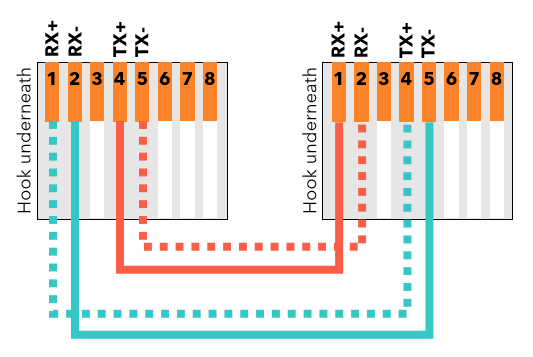
Ethernet crossover cables (Switched services)
When connecting like devices (e.g., switch to switch), you may need to use an Ethernet crossover cable.
Learn more about Ethernet crossover cables
Additional technical support
For additional support configuring or troubleshooting your network services, review our expanded index of technical topics:
- BGP prefix count limiting policy for IQ® Networking
- Configuring your MPLS circuits for failover
- Get ready for Transport/HSIP service
- Transmission control protocol (TCP) windowing
- Ethernet testing methodologies
- Resolving throughput issues
- Resolving poor performance
- Traceroute overview
- Using public vs. private IP addresses
Learn about scheduled activation for your new services.
To schedule activation for On‑Demand services, click the chat icon in Lumen Connect, then click Network‑as‑a‑Service (NaaS).
For other services, your customer care manager (CCM) will confirm a preferred activation scheduling window with you before the activation. The Lumen Scheduling team will confirm the activation schedule. Your designated contact needs to validate the date and time of this activation. Failing to show up for a scheduled activation is considered customer not ready.
Scheduled activation support
On‑Demand services
A chat agent will work with you to match your preferred activation window with a technician. You will receive a confirmation email with a meeting invite for the scheduled activation period and additional information.
Other services
Your customer care manager monitors the progression of your order. If your order includes managed devices, expect a site visit by a Lumen field technician to install and test the device before your scheduled activation. Once the service is ready, your assigned customer care manager or project manager will provide your site technical contact with necessary information for your configuration. Once Lumen has indicated that your installation is complete, a Lumen representative will contact you to coordinate the date(s) and time(s) for the equipment installation and other stages of your activation—including the activating your voice service and separately any porting in of telephone numbers.
Once confirmation of internal resource availability has been received with approval to schedule, Lumen will communicate the final date/time of your activation call. Before to your activation day, Lumen will contact you to confirm the date/time of your activation. If you need to change to the reserved activation date/time, please notify your customer care manager or project manager immediately so we can reschedule. If you are unable to be present for the activation or cancel/reschedule within 24 hours of the scheduled activation start time, additional charges may apply.
You will receive an email with the phone number and passcode for your scheduled activation call. If you need to access the call from a location outside the United States, use the phone numbers below, then enter your passcode.
Region | Toll free number | Toll number |
Australia (AUS) | 1800701141 | |
Austria (AUT) | 080088663573 | 12530840280 |
Belgium (BEL) | 080050352 | 027925465 |
Bulgaria (BGR) | 008001201148 | |
China Unified (CHU) | 4006323682 | |
Cyprus (CYP) | 80097480 | 22030461 |
Czech Republic (CZE) | 800500433 | 234147066 |
Denmark (DNK) | 80251187 | 36927682 |
Finland (FIN) | 0800773129 | 0923195613 |
France (FRA) | 0800946004 | 0359817975 |
Germany (DEU) | 08007234373 | |
Greece (GRC) | 0080016122079735 | 2111984737 |
Hong Kong SAR, China (HKG) | 800964804 | 30507500 |
Hungary (HUN) | 0680109899 | 19993940 |
India (IND) | 18002661080 | 4466886105 |
Indonesia (IDN) | 0018030207167 0078030207167 | |
Ireland (IRL) | 1800947779 | 16535937 |
Israel (ISR) | 1809455887 | 37207521 |
Italy (ITA) | 800980492 | 0419041078 |
Japan (JPN) | 0120603136 | 0345899986 |
Lithuania (LTU) | 880031778 | 52053821 |
Luxembourg (LUX) | 80027112 | 27860788 |
Malta | 80062939 | +356 27780671 |
Netherlands (NLD) | 08000224542 | 0207083816 |
New Zealand (NZL) | 0800453335 | 049749545 |
Norway (NOR) | 80051905 | 21034435 |
Philippines (PHL) | 180011101702 | |
Poland (POL) | 800707276 | 0223062213 |
Portugal (PRT) | 800788391 | 707201523 |
Romania (ROM) | 0800400066 | 215291711 |
Russian Federation (RUS) | 81080027385011 88001003634 | |
Singapore (SGP) | 8001013030 | 63494133 |
Slovakia (SVK) | 0800606688 | 0232786697 |
South Africa(ZAF) | 0800982081 | 218311980 |
South Korea (KOR) | 00798142075819 | 0222580947 |
Spain (ESP) | 900828612 | 935451957 |
Sweden (SWE) | 0201708210 | 0114966562 |
Switzerland (CHE) | 0800721087 | |
Taiwan (TWN) | 0809097814 | 0277438454 |
Thailand (THA) | 21040598 | |
Turkey (TUR) | 00800448829476 | 2169001663 |
United Arab Emirates (ARE) | 800035703141 | |
United Kingdom (GBR) | 08006922201 | 02070845235 |
United States (USA) | 8002409303 | 9139049360 |
Vietnam (VNM) | 12280020 18004901 |
If you are scheduled for an after‑hours or a weekend activation call and a Lumen resource doesn't show up for the event, please contact the Scheduling & Activations on‑call manager at 855‑572‑4322.
Scheduled activation: steps to success
Use the checklists below to understand what takes place during the activation and what you are responsible for before your scheduled activation.
On‑Demand services
To help ensure a successful activation, please complete the following tasks:
- Install your equipment
- Ensure you're able to locate the circuit at the demarc provided
- Ensure circuit is extended to where the managed router will be located at your site
- Ensure access to all points from the MPOE to your requipment
- Ensure someone will be on site to assist with the activation (if needed)
- Ensure someone will have access to your equipment (if needed)
- Configure your hardware with applicable configuration information as ordered before your scheduled activation (if possible)
- For IP and VLAN information, refer to your service activation email
- Confirm your hardware is set up and ready to be connected to the Lumen network
- Ensure you have the correct cable types
- Verify your cloud service provider (CSP) key for Ethernet On‑Demand
During the scheduled activation event, a conference call between you and Lumen, here are the service‑specific activation steps:
- Verify connectivity.
- Verify IPs and VLANs for Internet On‑Demand.
- Verify the data center token for Internet On‑Demand connections to data centers.
- Verify VLAN service configuration for Ethernet On‑Demand circuit termination and operation.
- Confirm service with Lumen as ordered and expected.
Other services
To help ensure a successful activation, please complete the following tasks relevant to your service:
- Install your equipment
- Ensure you're able to locate the circuit at the demarc provided
- Ensure circuit is extended to where the managed router will be located at your site
- Ensure access to all points from the MPOE to your requipment
- Ensure someone will be on site to assist with the activation (if needed)
- Ensure someone will have access to your equipment (if needed)
- Configure your hardware with applicable configuration information as ordered before your scheduled activation (if possible)
- For IP information, refer to your equipment data sheet
- For SIP trunk, ensure your firewall and/or ACLs are set up for the Lumen signaling and RTP IPs
- Confirm your hardware is set up and ready to be connected to the Lumen network
- Ensure you have the correct cable types
- If Lumen provides an ADTRAN or Cisco on‑site as a voice gateway, PRIs and digital trunks will require you to use a T1 crossover cable (Learn more about crossover cables)
- Stand-alone PRIs and digital trunks will require you to use a T1 straight cable
- For SIP service where Lumen is providing an SBC (session border controller), make sure you have both Ethernet straight and crossover cables on hand
During equipment installation, which occurs prior to the scheduled voice-activation event, here are the specific installation tasks:
- You are not required to join a conference bridge during the equipment installation process.
- You must arrange and confirm site access for the Lumen field technician or Lumen vendor.
- Your local contact must have knowledge of your server/data room location.
- Your local contact must also have knowledge of rack space reserved for Lumen equipment.
- While the Lumen field technician will have the demarcation information from the LEC’s records, your local contact must have knowledge of the location of the Lumen circuit.
- You will need to provide adequate/necessary power to support Lumen routers or circuit-termination equipment as required.
- You will receive an IP configuration letter from your customer care manager after the equipment is installed.
During the scheduled activation event, a conference call between you and Lumen, here are the service-specific activation steps:
- Verify connectivity.
- Verify IPs or circuit termination and operation.
- Confirm service with Lumen as ordered and expected.
- Complete test call requirements depending on service type: IP or TDM.
Production support
On‑Demand services
If you have activated your service but have not been able to pass any traffic open an activation ticket by clicking chat and selecting Network‑as‑a‑Service (NaaS). If you are experiencing issues after passing traffic for at least 12 hours open a repair ticket in Lumen Connect (our customer portal).
Other services
If you have recently activated your service, but have been unable to pass any traffic, please contact your customer care manager to engage the Post Activation Support team.
If you have activated your service but are experiencing issues after passing traffic for at least 12 hours, please contact the Lumen Repair Center at 877-453-8353. You can also open a repair ticket in Lumen Connect (our customer portal).
Customer not ready policy
Lumen aims to deliver your service with your cooperation as of the customer commitment date (CCD). If we cannot deliver your service due to your inaction, unreadiness, delay, or failure to complete activities necessary for a successful delivery, we will not be liable for delay remedies otherwise available to you and we may send you an effective bill date notice. Thereafter, we will begin charging for service(s) and they will appear on your first invoice. If you have any questions about any site readiness or other actions you need to complete so we can achieve the CCD and assure you are ready, please contact your customer care manager as soon as possible. Additionally, communicating important information to your site technical contact as soon as possible will help identify and address any issues ahead of time. Our goal is to work with you to achieve an exceptional delivery experience.
This policy does not apply to On‑Demand services.
Customer cancellation policy
On‑Demand services
If you need to cancel or reschedule your activation, click the chat icon in Lumen Connect, select Network‑as‑a‑Service (NaaS), and work with the chat agent to cancel or reschedule.
You must cancel one business day before the confirmed activation date and time. If it is within one business day, the cancelation will result in a charge (see below).
Other services
Lumen will confirm the specified scheduled date and time of the requested activation submitted by the customer care manager on your behalf. Lumen Scheduling will provide a confirmed email with the scheduled activation date to you, your assigned customer care manager, and the remote activation tech. (If required, a confirmation to the field tech assigned to install the equipment will also be provided.) In addition, Lumen will provide additional best‑effort notifications to remind you about your scheduled activation date and time. Below are the cancellation options:
- You must cancel one business day before the confirmed activation date and time. If it is within one business day, the cancelation will result in a charge (see below).
- You may also contact your assigned customer care manager to cancel or reschedule the activation.
Charges for cancellation or customer not ready
Any customer cancellation less than one business day from the scheduled event or if a customer is not ready during the scheduled event will be charged a cancellation fee. This is done on a per-site and per-region basis.
All regions | North America | Asia | ||
Item | MRC | NRC | ||
With field dispatch: This charge applies when a Lumen technician or vendor is dispatched to a customer site or remote Lumen site that was scheduled to be activated during the event. | n/a | $500 | $950 | |
Without field dispatch: This charge applies per site that was scheduled to be activated during the event. | n/a | $250 | $250 | |
Learn how to prepare for scheduling activations for managed services.
Your customer care manager (CCM) will confirm a preferred activation scheduling window with you before the activation. This activation schedule will be confirmed by the Lumen scheduling team.
Your designated contact needs to validate the date and time of this activation. Failing to show up for a scheduled activation is considered customer not ready (see section below).
Scheduled activation for managed services
Scheduled activations for service(s) that include managed router or managed security equipment requires a two-step process that includes an equipment installation stage as well as a scheduled activation event between you and Lumen. If your order includes Managed Router Services (MRS) or Managed Security Services (MSS), expect a site visit by a Lumen field technician to install and test the equipment before the scheduled activation event.
- Provide the site technical contact with the IP configuration details early to allow more preparation time before the stage 2 installation.
- If the IP configuration details cannot be included, add “no auto-negotiate” to the IP letter.
Your assigned customer care manager will provide the site technical contact with an IP configuration letter once the equipment installation has been complete. This letter explains how to load the correct IP configuration on your device in preparation of the scheduled activation event.
Scheduled activation support
Your customer care manager monitors the status of your order. Once we have indicated the order to be installation complete, a Lumen representative contacts you to coordinate the date(s) and time(s) for the equipment installation and scheduled activation events.
Once confirmation of internal resource availability has been received with approval to schedule, Lumen will communicate the final date/time of your activation call. Prior to your activation day, we will reach out to the provided contact information and confirm the date/time of your activation.
If you need to make any changes to the reserved activation date/time, please notify your customer care manager immediately to reschedule. In the event you are unable to be present for the activation or cancel/ reschedule within 24 hours of the scheduled activation start time, additional charges may apply.
If you have been scheduled for an afterhours or a weekend activation call, and a Lumen resource does not show up for the event, please contact the scheduling & activations on-call manager at 844-427-2875. Please see the checklist below to understand what will take place during the activation, as well as what responsibilities you have prior to the scheduled event.
Scheduled activation: steps to success
To help ensure a successful activation, please complete the following tasks:
- Install your equipment
- Ensure circuit is extended to where the managed router will be located at your site
- Configure your hardware with applicable speed and duplex (not auto-negotiate)
- Confirm your hardware is set up and ready to make connection to the Lumen network
- Identify appropriate space and power available and be ready for equipment installation
During the installation of managed network or managed security equipment, which occurs prior to the scheduled activation event, the specific installation steps are as follows:
- You are NOT required to join a conference bridge during the equipment installation process.
- You must arrange and confirm site access for the Lumen field technician. Your local contact must have knowledge of your server/data room location.
- Your local contact must also have knowledge of rack space reserved for Lumen MNS or MSS equipment.
- While the Lumen field technician will have the demarcation information from the LEC’s records, your local contact must have knowledge of the location of the Lumen circuit
- You will need to provide adequate/necessary power to support Lumen MNS or MSS equipment
- You will receive an IP configuration letter from your customer care manager after the install of the MNS or MSS equipment
During the scheduled activation event, which is conducted as a conference call between Lumen and the customer, the service-specific activation steps are as follows:
- Verify connectivity.
- Ensure LAN block is being routed correctly; Establish routing protocols.
- Establish routing protocols.
- Confirm service with Lumen.
- Verify connectivity to other locations.
Production support
If you have recently activated your service, but have been unable to pass any traffic, please contact your customer care manager to engage the Post Activation Support team.
If you have activated your service but are experiencing issues after passing traffic for at least 12 hours, please contact us at 877-453-8353.
Bill start date for VPN customers
- If we are simply adding sites to your existing network: we will start billing upon activating each site.
- If we are installing a new network: we will start billing once we have activated two sites. If you prefer which two sites we activate first, please contact your customer care manager.
- In both instances, you will receive a connection notification letter confirming that we have started billing your VPN service.
Troubleshooting common activation problems
The following have been found to be common causes for not being able to successfully pass traffic. To help you quickly resolve this, we recommend that you double check these items before calling Lumen for support.
- Verify power is correctly connected to your equipment by cycling the power (turning off and then back on).
- Confirm cabling is installed correctly by simply unplugging the cable and plugging it back in.
- Confirm the current state of equipment interface is in an ‘up’ state. The interface setting must match the Lumen configuration speed and duplex.
- Validate that the circuit you (or your LEC—local exchange carrier) provided is working as ordered. Ensure that you can confirm power to the LEC devices. If there appears to be power and still no service, please obtain the LEC circuit ID before contacting us.
- Confirm that the internal routing is configured correctly.
- Verify that your class of service (CoS) has been configured.
- Verify you’re not exceeding port capacity as ordered. If you have Ethernet service(s), it is usually necessary to ensure traffic shaping (or packet shaping) is enabled on the router. Contact your Lumen representative for additional capacity.
- If you are experiencing an impairment involving packet loss or routing; Trace routes, source and destination pings are necessary for Lumen to assist in resolving the issue.
- To verify your quality of service (QoS), you can use the speed test link below. Note: Testing the speed of an off-network circuit is not a reliable indication of QoS. This testing should not be confused with class of service (CoS) testing.
Customer not ready policy
Lumen aims to deliver your service with your cooperation as of the customer commitment date (CCD). If your delay or inaction prevents Lumen from completing service installation, Lumen will begin charging for service(s) starting on the customer commitment date. Service charges will continue to accrue until the customer is ready and Lumen can complete service installation. Accrued service charges will appear on your first invoice. If you have any questions about any site readiness or other actions you need to perform to enable us to achieve the CCD and assure you are ready, please contact your customer care manager as soon as possible. Additionally, communicating important information to your site technical contact as soon as possible will help identify and address any issues ahead of time. Our goal is to work with you to achieve and exceptional delivery experience.
Customer cancellation policy
Lumen will confirm the specified scheduled date and time of the requested managed activation submitted by the customer care manager on behalf of the customer. Lumen Scheduling will provide a confirmed email with the scheduled managed activation date to you, your assigned customer care manager and the remote managed activation tech (a confirmation to the field tech assigned to install the equipment will also be provided). In addition, Lumen will provide additional best effort notifications to remind the customer about their respective scheduled managed activation date and time. Below are the cancellation options:
- You must cancel one business day before the confirmed managed activation date and time. If it is within one business day, the cancelation will result in a charge (see below).
- You will have the option to cancel or rescheduled your managed activation without charges one business day before the confirmed activation date by calling 844-427-2875 Monday–Friday, 7:00am–7:00pm CT.
- You may also contact your assigned customer care manager to cancel or reschedule the managed activation.
Charges for cancellation or customer not ready
Any customer cancellation less than one business day from the scheduled event or if a customer is not ready during the scheduled event will be charged a cancellation fee. This is done on a per-site and per-region basis.
All regions | North America | Asia | |||
Item | MRC | NRC | |||
With field dispatch: This charge applies when a Lumen technician or vendor is dispatched to a customer site or remote Lumen site that was scheduled to be activated during the event. | n/a | $500 | $900 | ||
Without field dispatch: This charge applies per site that was scheduled to be activated during the event. | n/a | $250 | $250 | ||



