Viewing details for a virtual machine
Use the Dedicated Cloud Compute portal to view details for your virtual machines for Lumen® Dedicated Cloud Compute. You can view the status of the virtual machine, the vCPU and vRAM shown in circular and line graph form, server information such as the name, operating system, IP address, and storage for the virtual machine.
You can use the details page to perform actions on your virtual machine such as stopping, cloning, or restarting. The details page gives you the option to modify the name of the virtual machine, as well as adding or changing storage options. Changing the Hot Add status gives you the option to change or add resources to a running virtual machine. You can choose and view the utilization metrics for your virtual machines.
Note: To access the Dedicated Cloud Compute portal, you must have a username and password for Managed Services portal.
To view details for a virtual machine:
- Sign in to the Managed Services portal.
- Using the left navigation, click Infrastructure, then click Overview.
The Dedicated Cloud Compute portal shows the clusters for each data center in your organization.
- Select a virtual machine from the expanded menu to view details for that virtual machine. (The expanded menu can collapse to show only the data centers or expand to show clusters and virtual machines.)
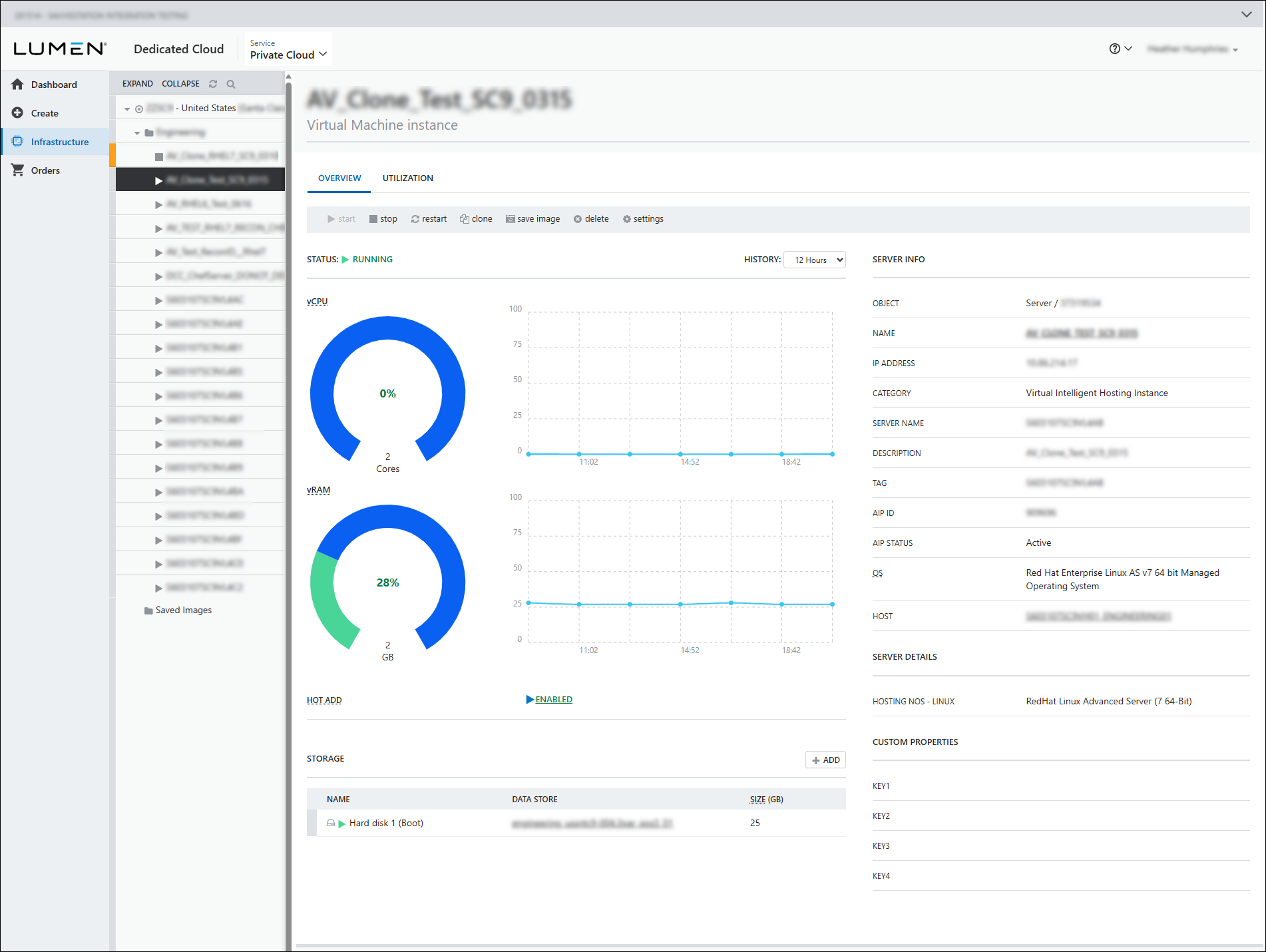
- To perform actions on manage your virtual machine, do any of the following:
- To start a virtual machine that has been stopped, click
arrow_right start, then click Yes.
- To stop a virtual machine, click
stop stop, then click Yes.
- To restart a virtual machine, click
cached restart, then click Yes.
- To clone a virtual machine, click
content_copy clone, then click CONFIRM.
- To save an image of a virtual machine, click
folder save image, type a friendly name, choose a data store, then click SAVE ORDER.
- To delete a virtual machine, click
cancel delete, verify you are deleting the correct virtual machine, then click confirm.
- To start a virtual machine that has been stopped, click
- To make changes to a virtual machine, click
build_circle settings:
- Select the Resources tab, select vcpu processors, select vram memory.
- To allow resources to be changed on your virtual machine while the machine is running, click Yes to enable Hot Add. If not, click No.
- When you are finished making changes, click UPDATE.
- Select the Add Disk tab. You can not change the name but select a DATA STORE to add the storage to and select a storage SIZE.
- When you are finished making changes, click UPDATE.
- Select the Server Info tab and type a name in the preferred name field.
- When you are finished making changes, click UPDATE.
- To view information about your virtual machine, review the following sections:
- The current status of the virtual machine (for example, Running). The vCPU and vRAM usage is shown as circular graphs. The page shows usage bar graphs over a period of time. The history can be changed to 12 hours, 1 week, or 2 weeks.
- The Server Info section shows details such as operating system, the tags created for the virtual machine, the name you chose for hte virtual machine, the AIP (Azure Information Protections) ID and status, and the host associated with the virtual machine. Click the name in this section to open the Server Info tab under the Settings option. You can make changes to the name you have given the virtual machine.
- The Server Details section show the hosting NOS (network operating system) and SIA (secure internet access) running on the virtual machine.
- The Custom Properties section shows the keys used on the virtual machine.
- The Storage section shows the hard disk name on the virtual machine, the data stores on the virtual machine, and the amount of storage in each data store. When you click the data store name, the DCC portal opens the cluster view of storage resources. Click the Add+ button in this section to open the Add Disk tab under the Settings option. You can add a new disk to a data store on the virtual machine.
- The Hot Add section shows if the virtual machine is enabled to allow changes or additions to the configuration while running. Click on the current status to open the Resources tab under the Settings option. You can make changes to the current selections.
- The current status of the virtual machine (for example, Running). The vCPU and vRAM usage is shown as circular graphs. The page shows usage bar graphs over a period of time. The history can be changed to 12 hours, 1 week, or 2 weeks.
Note: The Hot/Add feature is dependent on the guest OS and ESX version of the virtual machine. Check the VMware Compatibilty Guide for VM support. Learn more about the Hot/Add feature if you are running Linux-64 bit guest OS with 3GB vRAM or less.



