Provisioning an Internet On-Demand order
You can provision a Lumen® Internet On-Demand order using Lumen Connect®. The Lumen® Fabric Port must be installed to provision the connection.
To provision an order:
- Using the left menu, click Services, then click Order Status.
- Select Pending from the status list, then click Apply.
- Click the icon in the Actions column next to the connection you want to modify, then click Order Details.
Lumen Connect shows the Order Details page.
- Click the Actions button, then click Provision Now.
- Review the service details, accept the notice, then click Provision Now.
- Once the order is complete, your order information shows the VLAN and WAN IP addresses.
Use the VLAN provided for tagging, which is required for On‑Demand services. Use the On‑Demand service configuration guidelines to ensure your equipment is ready.
Use the IP address information to configure your router or equipment:
- WAN IP Block: X.XX.XXX.152/30
- Provider Edge (PE) Router Address (Gateway IP): X.XX.XXX.153
- Customer Edge (CE) WAN Address: X.XX.XXX.154
- LAN IP Block: X.XX.XXX.160/29
- Customer Usable LAN IP Addresses: X.XX.XXX.161‑X.XX.XXX.166
- Broadcast IP Address: X.XX.XXX.167
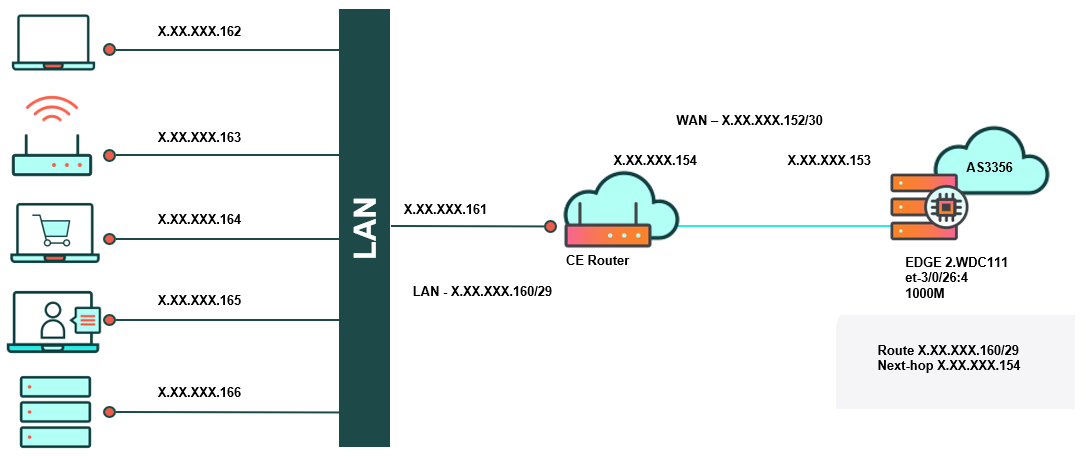
Refer to your equipment provider or network professional for assistance with VLAN.
You can monitor the service using Network Visibility and manage your service using Lumen Connect.



