Multi-Cloud Gateway
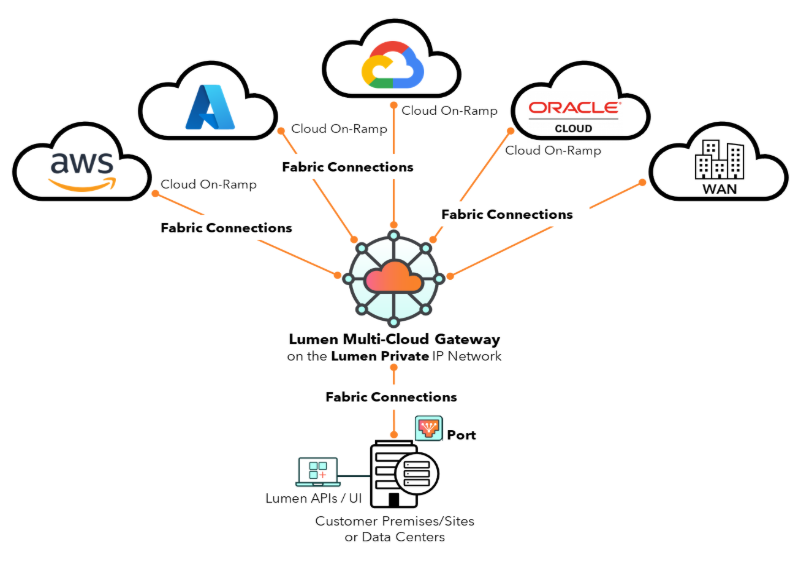
Lumen® Multi-Cloud Gateway streamlines cloud connectivity via virtual Layer-3 routing built on Lumen network fabric. With Multi-Cloud Gateway, you have private, predictable networking between cloud providers, data centers, and enterprise locations on the Lumen private IP backbone. This provides lower latency, better security, and simple operations.
Multi-Cloud Gateway features allow you to quickly configure centralized routing for managing multi-cloud and port connectivity.
- A Multi-Cloud Gateway is routing for cloud and port connectivity. After adding a Multi-Cloud Gateway, you add interfaces.
- Multi-Cloud Gateway interfaces are virtual interfaces where you attach Fabric Connections and configure Layer-3 addressing, routing, and BGP peering.
- Ethernet Fabric Connect defines Layer-2 virtual point-to-point and hosted cloud connections.
- Set up BGP peering between enterprise edge and Multi-Cloud Gateway, specifying ASNs, peer IPs, authentication, and prefix lists.
- Apply routing policies and communities for traffic engineering and control.
- Configure static routes for point-to-point or backup paths.
- Configure IPv4 IP addresses and subnet masks.
- Routing tables show where network traffic is directed.
- Tiers aligned to aggregate connectivity attachments.
- Add and manage hosted cloud connections.
Managing Multi-Cloud Gateway
Add Multi-Cloud gateways, interfaces, and Ethernet Fabric Connect using Lumen Connect®. You'll need BGP and routing information to define BGP sessions, prefix lists, and static routes.
Multi-Cloud Gateway APIs
Leverage Multi-Cloud Gateway APIs from Lumen Technologies to create and manage virtual routing instances to interconnect and route between connections to clouds, data centers, and locations.
Getting support for Multi-Cloud Gateway
- Click Ask Lumen (within Lumen Connect) for help with:
- Questions about Multi-Cloud Gateway.
- Navigating Lumen Connect.
- Errors when provisioning Multi-Cloud Gateway.
- Problems accessing On-Demand services (usually due to user permissions).
- Questions about Multi-Cloud Gateway.
- Open a repair ticket in Lumen Connect if you experience a service outage or degraded service.



