Requesting a customer service record (CSR)
Using the Carrier Port-Out Tool, you can request a customer service record (CSR) for a phone number(s) you want to port away from SPID 8824. You can request customer service records either individually (by typing/pasting in up to 200 phone numbers) or in bulk (by uploading a spreadsheet with up to 10,000 phone numbers). Once you receive a clean CSR, you then submit a local service request (LSR) to port the number to your SPID.
Note: To submit multiple phone numbers with different end users and/or locations, use the bulk request.
Requesting a CSR for up to 200 phone numbers
Use this option to type or paste in up to 200 phone numbers. This option works well if you're porting only a few numbers.
To request a customer service record for up to 200 phone numbers:
- If you have more than one SPID, select the SPID you want to work with, then click Continue.
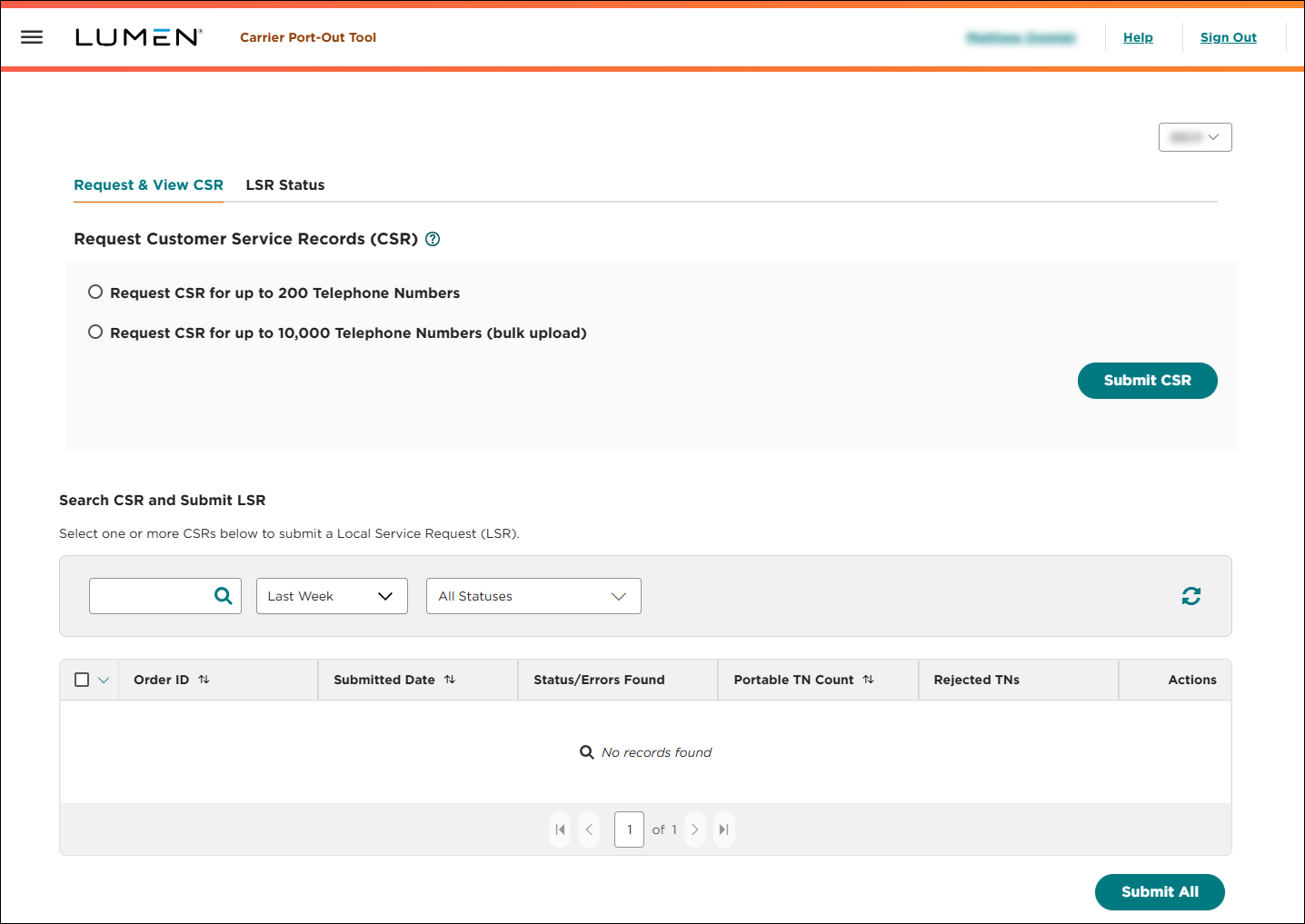
- Select the Request CSR for up to 200 Telephone Numbers radio button.
- In the Enter Telephone Numbers field, type or paste up to 200 phone numbers using the format 2345678901. Separate phone numbers with commas, spaces, or new lines. Use a dash to search for a range of phone numbers (e.g., 2223334444-4450).
- In the Telephone Number Type field, do one of the following:
- If the number(s) are for residential use:
- Select the Residential radio button.
- Type the first and last name, address, city, state, and ZIP code for the end user.
- Select the Residential radio button.
- If the number(s) are for business use:
- Select the Business radio button.
- Type the business name, address, city, state, and ZIP code for the end user.
- Select the Business radio button.
- If the number(s) are for residential use:
- In the Porting Authorization Person field, type the name of the person authorizing the port (the person who signed the letter of authorization/LOA).
- Click Submit CSR.
The Carrier Port-Out Tool submits your request and shows a voice order ID. You can now track its status online. Search for the CSR, review and resolve any errors to get a clean CSR, and then submit a local service request.
- Write down (or save) the voice order ID. You'll need this number to check for any errors and to submit the local service request.
Note: Write down (or save) the voice order ID. You'll need this number to check for any errors and to submit the local service request.
Requesting CSRs for up to 10,000 phone numbers (bulk request)
Use this option for up to 10,000 phone numbers. This option also works well for you're porting multiple phone numbers with different end users and/or locations.
To request customer service requests for up to 10,000 phone numbers:
- If you have more than one SPID, select the SPID you want to work with, then click Continue.
- Select the Request CSR for up to 10,000 Telephone Numbers (bulk request) radio button.
- Click Download Bulk Template, then save the file to your computer.
- Open the template and fill in the details for each phone number (up to 10,000). When you're done, save the file to your computer.
- In the Carrier Port-Out Tool, click Bulk Upload, click Choose File.
- In the window that appears, browse to locate the file, click Open, then click Upload.
The Carrier Port-Out Tool validates the data in the spreadsheet.
- Click Submit CSR.
The Carrier Port-Out Tool submits your request and shows a voice order ID. You can now track its status online. Search for the CSR, review and resolve any errors to get a clean CSR, and then submit a local service request.
Note: Write down (or save) the voice order ID. You'll need this number to check for any errors and to submit the local service request.



