

VoIP Receptionist Console
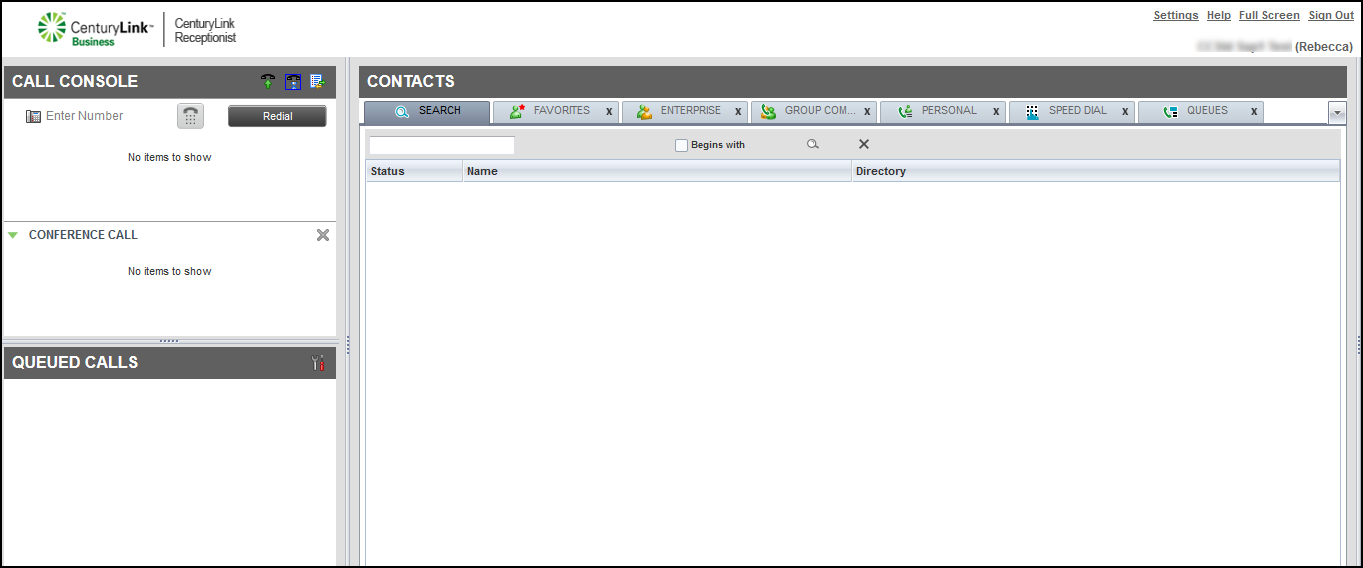
Lumen® Receptionist Console is a carrier‑class attendant console developed specifically for hosted environments. It is used primarily by receptionists or phone attendants who screen inbound calls. The Receptionist Console offers
- an easy‑to‑use, web‑based interface
- ergonomic design that follows the natural flow of a call from the left to the right of the screen
- adheres to professional call handling as critical information is available in realtime
Using Receptionist Console
Getting started
Learn how to access Receptionist Console, and explore the features for managing calls, using your directories, and accessing Receptionist Console settings.
Making and managing calls
Learn how to answer and make calls, start conference calls, place calls on hold, transfer calls, and set call control services.
- Announcing a call before transferring in Receptionist Console
- Answering calls
- Calling from Receptionist Console
- Conference calling from Receptionist Console
- Placing a call on hold and resuming a call
- Speed dialing a contact from Receptionist Console
- Transferring a call without announcing the caller in Receptionist Console
- Transferring a caller to voicemail
- Turning Call Forwarding Always on and off
- Turning Do Not Disturb on and off
- Viewing and using your call history
- Viewing the status of your current calls
Using the Contacts pane
Learn how to access and use your Receptionist Console directories to find and edit contact records and control who you monitor.
- Adding a contact to your personal directory
- Adding a contact to your speed dial directory
- Deleting a contact from your personal directory
- Deleting a contact from your speed dial directory
- Making notes about a contact
- Monitoring contacts in Receptionist Console
- Searching for a contact in Receptionist Console
- Using the quick search feature in Receptionist Console
- Viewing and using your enterprise directory in Receptionist Console



