Exploring the Lumen Connect dashboard
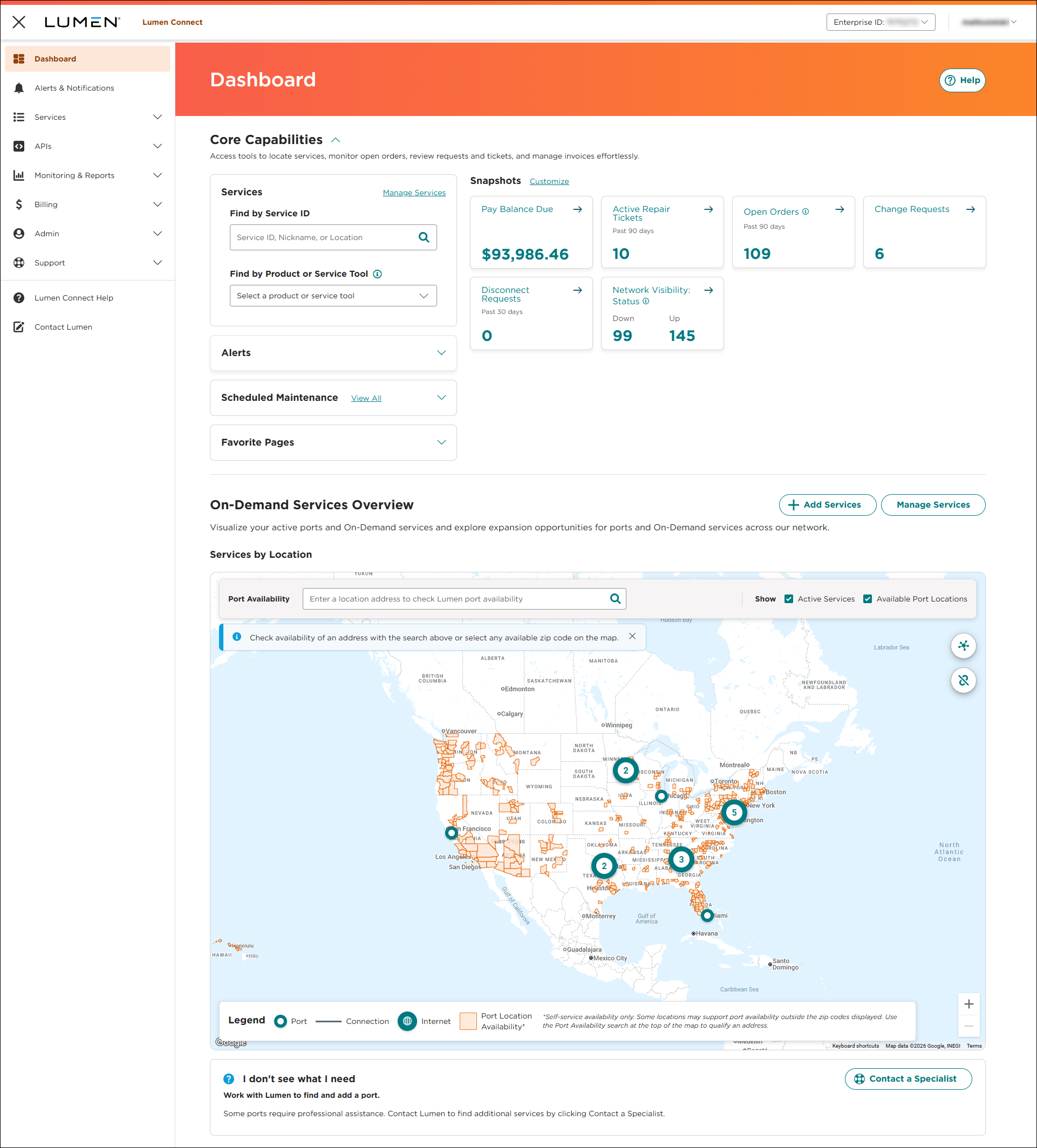
When you sign in to Lumen Connect, the dashboard appears. You'll see navigation tabs on the left side of the portal and widgets to give you more insight into your services. You can also customize your Lumen Connect dashboard to select the widgets you want to see and the order you want to see them in.
Portal navigation
Use the navigation tabs to manage your services:
- Dashboard—access the Lumen Connect dashboard
- Alerts & Notifications—view your alerts and notifications; create notification settings to customize your alerts
- Services—view/manage your Lumen services, orders, and more
- APIs—create and manage API keys (for using Lumen APIs)
- Monitoring and Reports—create reports, analyze your network use and performance, access Usage Analyst to create and view use reports
- Billing—view/pay/print invoices, create billing tickets, analyze your invoice, add accounts, create and view billing reports using Bill Analyst
- Admin—add/manage users, manage user permissions, manage access to accounts, and manage shared documents for your organization
- Support—create/view repair tickets, view planned network maintenance, request a configuration change, and more
- Lumen Connect Help—access portal documentation, release notes, and more (this library).
- Contact Us—access our support teams to get help with billing, repair, portal, or other issues you're having.
Additional links (available at the top of every page in Lumen Connect):
- Enterprise ID—if you have access to multiple enterprise IDs, click the enterprise ID to switch to another or to set your default enterprise ID.
- Username—click your username to view and edit your user profile, view notifications, manage your notification settings, find your system administrator(s), and to sign out.
Dashboard widgets
Use the dashboard widgets to view orders and tickets by service location, access the pages you visit most, view information about upcoming network maintenance, etc.
- Services widget—search for services, quickly access a list of all services, view a filtered list of services for a specific product, and access tools to manage services such as Lumen® On-Demand services and Lumen® Edge Bare Metal.
- Alerts widget—shows alerts triggered based on your notification settings as well as Lumen notifications (such as release announcements); click the notification to view its details.
- Scheduled Maintenance widget—view planned network maintenance affecting your services for the coming month; click to view more information about the event(s).
- Favorite Pages widget—view and access the portal pages you use most often.
Snapshots
Use the Snapshots section to quickly track information about your Lumen services, such as your balance, tickets, orders, change requests, and more. To view more information, click the snapshot to access more detail.
- Pay Balance Due—shows the total amount due for your accounts; click the snapshot to make a payment.
- Active Repair Tickets—shows open repair tickets for the past 90 days; click the totals to view status information for the tickets or to create a new ticket.
- Open Orders—shows the total number of open install, change, and disconnect orders for your organization (including child orders); click the snapshot status information and details for the orders.
- Change Requests—shows the total number of change requests for your organization; click the snapshot to view the status of a request or to create a new one.
- Disconnect Requests—view the total number of disconnect requests open for your organization.
- Billing Requests—shows the total number of billing requests in Open, Active, or Closed status for your organization; click the snapshot to view your billing requests.
- Network Visibility: Status—view a quick Up or Down status for your services; click snapshot to view more details in Network Visibility.
- Outstanding Billing Requests—shows the total number of billing requests in Open, Processing, or Active status; click the snapshot to view more information.
- Active Portal Support Tickets—shows the total number of open portal support tickets within the past 90 days; click the snapshot to view current status or to create a new portal support ticket.
- Potential Repair Tickets—shows the total number of potential repair tickets (for services where we've detected a potential problem) within the past 90 days.
- Security Change Requests—shows the total number of open security change requests for security services.
On-Demand services overview
Visualizes where Lumen® On-Demand services are available and shows your current NaaS-enabled ports and On-Demand services:
- Qualify new locations for NaaS-enabled ports.
- Add new services directly from the map interface.
- Manage existing On-Demand services and unconnected services.
- Identify and address unconnected services for improved network coverage.
- Streamline experience for viewing connections and managing service details in one place.
Note: You will only see services on the map if you have active On-Demand services.



